
Ymer

Key Features
- Frequency-selective distortion that targets a specific band of the spectrum while preserving the rest of the signal
- Built-in frequency analyzer with click-and-drag zone selection for visual, intuitive distortion targeting
- Analog-style saturation engine that adds warm harmonic coloration with zero clipping at the output
- Two-knob control scheme with Add FX (intensity) and Analog (tonal color) for fast, focused sound shaping
- Preset manager with support for saving and loading individual presets and full preset banks
- Resizable GUI that adapts to any workspace size and screen resolution
- 32-bit and 64-bit VST2/VST3 support on Windows with no registration or authorization required
Description
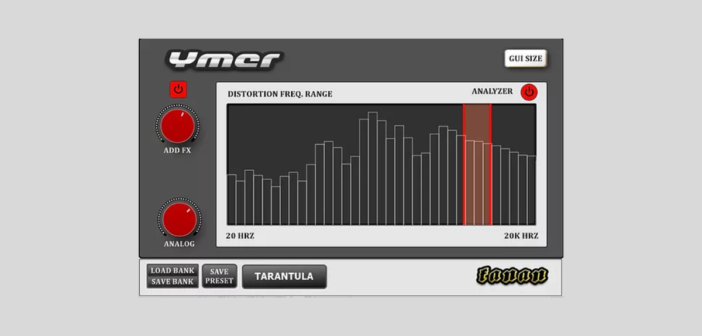
Ymer by Fanan Team is a frequency-selective distortion effect that lets you target a specific band of the frequency spectrum for saturation while leaving the rest of the signal untouched. Rather than applying distortion across the entire audio signal, Ymer isolates a chosen frequency zone and pushes it to its peak, helping tracks cut through a dense mix without mangling the overall sound.
The interface keeps things minimal with just two control knobs and a frequency spectrum display. The Add FX knob sets the distortion intensity, while the Analog knob shapes the tonal color of the saturation, adding a warm, gritty analog character.
To select which frequencies get distorted, you click and drag directly on the built-in frequency analyzer to define your target zone. This visual approach makes it fast to isolate problem areas or boost presence in a specific range.
The plugin includes a built-in preset manager that supports saving individual presets and full banks. The resizable GUI adapts to your workspace, and the distortion engine is designed to keep output healthy with zero clipping even at extreme settings.
Ymer draws comparisons to dual-filter distortion approaches but takes a more direct, frequency-focused path that can be better suited for surgical enhancement of specific mix elements. It works well on individual tracks where you want harmonic richness in one frequency band without coloring the rest.
Video Preview

Frequently Asked Questions
How does Ymer differ from a standard distortion plugin?
Unlike conventional distortion effects that process the entire audio signal, Ymer lets you isolate a specific frequency zone on its built-in analyzer and apply saturation only to that band. This allows tracks to gain presence and harmonic richness in a targeted area while keeping the rest of the signal clean and unaffected.
Does Ymer work on macOS or Linux?
No, Ymer is currently Windows-only and is available in VST2 and VST3 plugin formats. There is no macOS, Linux, or AU/AAX version at this time.
Can Ymer cause clipping or digital distortion artifacts?
The distortion engine in Ymer is designed to keep the output signal healthy with zero clipping, even when pushing the Add FX knob to extreme settings. The analog-modeled saturation adds warmth and grit without harsh digital artifacts.
What types of material does Ymer work best on?
Ymer excels on individual tracks where you want to add harmonic presence in a specific frequency range, such as making a vocal cut through a dense mix, adding bite to a snare drum, or bringing out the mid-range character of a guitar or synth part.


