
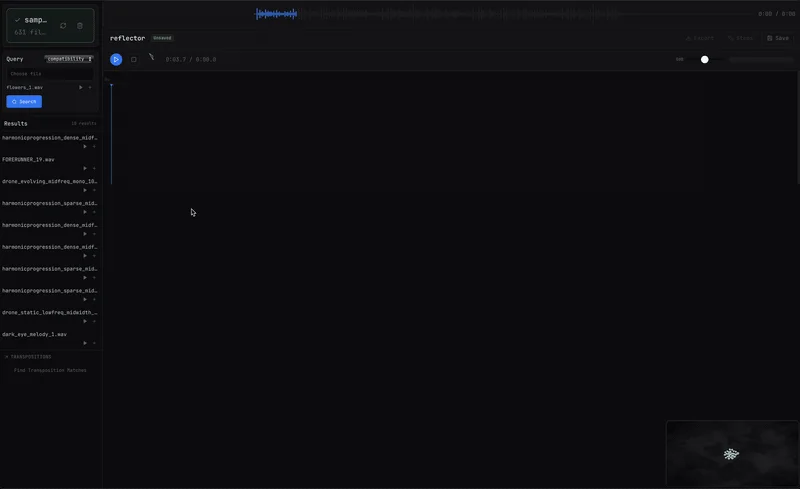
Reflector
Key Features
- Indexes a personal sample library so retrieval works on sounds the producer already owns.
- Compatibility and similarity lenses separate sounds that combine well from sounds that closely resemble the query.
- Transposition matching can surface candidates that fit after pitch shifting.
- Arrangement-aware suggestions update as material is placed on the multi-track timeline.
- Automatic crossfades, duplication, and by-ear transposition support fast sketching inside the app.
- Galaxy view maps saved sessions by harmonic identity for navigating a larger body of work.
- Exports the full session to WAV or stems with placements for further work in a DAW.
Description
Reflector is a standalone macOS workstation from Austin Rockman for finding harmonically compatible material inside a personal sample library. Instead of searching a third-party catalog, it indexes the user's own audio and suggests samples that combine with a selected sound or with the arrangement as it develops.
The workflow is built around two retrieval lenses: compatibility for sounds that work together, and similarity for sounds that resemble the current query. Reflector can also show transposition matches, so a candidate that fits after pitch shifting can surface instead of being missed.
Once sounds are found, Reflector gives them a place to become an arrangement. The app includes a multi-track timeline with duplication, automatic crossfades, by-ear transposition, WAV export, stem export, and a galaxy view that maps saved sessions by harmonic identity.
The important limitation is that Reflector listens for pitch, not rhythm. It is aimed at tonal and textural material such as pads, keys, strings, synths, guitars, vocals, field recordings with a tonal center, and sound design that carries harmony, rather than beat matching drum loops.
Frequently Asked Questions
Is Reflector a plugin?
No. The official materials describe Reflector as an interactive audio workstation and the release provides a signed macOS application. It does not list VST, AU, AAX, or other plugin formats.
What kinds of samples work best in Reflector?
Reflector is built for tonal and textural material with meaningful pitch content. Pads, keys, strings, synths, guitars, vocals, tonal field recordings, and harmonic sound design are better fits than purely rhythmic drum loops.
Does Reflector analyze rhythm or beat match loops?
No. The developer states that Reflector hears pitch and does not currently analyze rhythm or beat match. A rhythmic loop may still produce interesting retrieval results, but rhythm is not the basis of its matching system.
Does Reflector send audio or usage data to a server?
The official README says Reflector runs locally and that audio and usage data stay on the user's machine. Its model was trained on synthetic audio rather than copyrighted or commercially licensed material.


