
Buttons from Hell
Key Features
- 96 button and switch samples mapped into a compact Decent Sampler instrument
- Two round robins for more natural repeated clicks and mechanical accents
- Filter, reverb, saturation, and decay controls for quick sound shaping
- Raw WAV material can be extracted from the library file for audio-only workflows
- Custom interface built from vector graphics and real-world material photos
- Small 12.1 MB download that works well as a quick percussive layering tool
Description
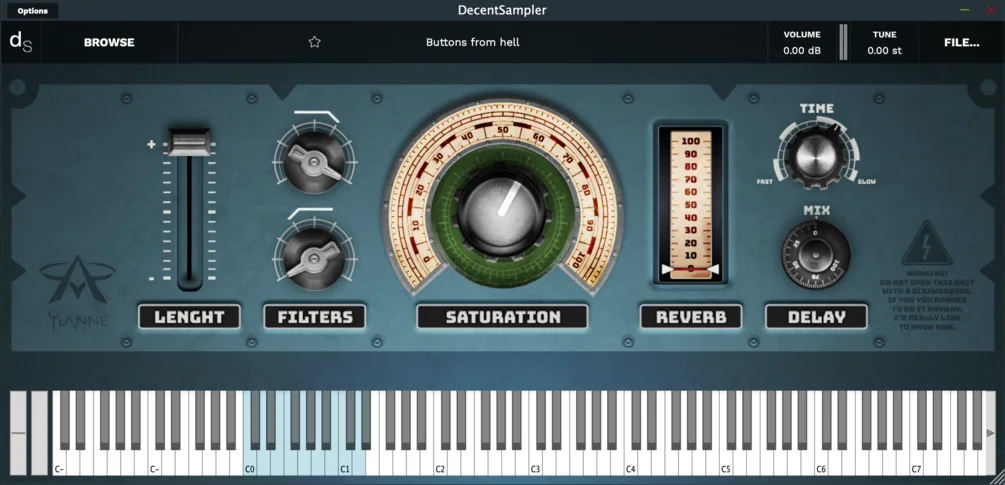
Buttons from Hell is a Decent Sampler instrument built from the close-miked clicks, clacks, thuds, and mechanical movement of everyday switches and buttons. The source material includes cassette recorder controls, guitar pedals, a light switch, a power strip, and computer keyboard sounds shaped into playable percussive hits.
The library works best as a compact sound-design layer rather than a conventional drum instrument. Its 96 samples and two round robins give producers a quick way to add tactile transient detail, metallic ticks, and rough industrial movement underneath drums, transitions, and cinematic cues.
Inside Decent Sampler, the instrument gives you filter, reverb, saturation, and decay controls, so the same recordings can become short clicks, resonant thuds, or longer processed textures. The custom interface also matches the gritty source material with vector graphics and photos of real materials.
The official page lists a 12.1 MB file size, 96 samples, two round robins, and Windows, macOS, and Linux compatibility through Decent Sampler.
Video Preview

Frequently Asked Questions
Does Buttons from Hell require Kontakt?
No. The official product page says it requires the Decent Sampler plugin and is not a standalone plugin, so the site category is being used for sampler-library handling rather than a Kontakt-only requirement.
What kinds of sounds are included?
The library focuses on close-recorded mechanical button and switch sounds. Source objects named by the developer and coverage include a cassette recorder, guitar pedal, light switch, power strip, and computer keyboard.
Can the sounds be used outside Decent Sampler?
Yes. The BPB coverage notes that raw WAV files are available by extracting them from the library file, which makes the source sounds usable in a DAW sampler or audio editor.
What controls are available in the instrument?
The Decent Sampler interface includes filter, reverb, saturation, and decay controls. Those controls let the same recordings work as short clicks, longer mechanical tones, or processed industrial percussion.


