StereoMixer

Key Features
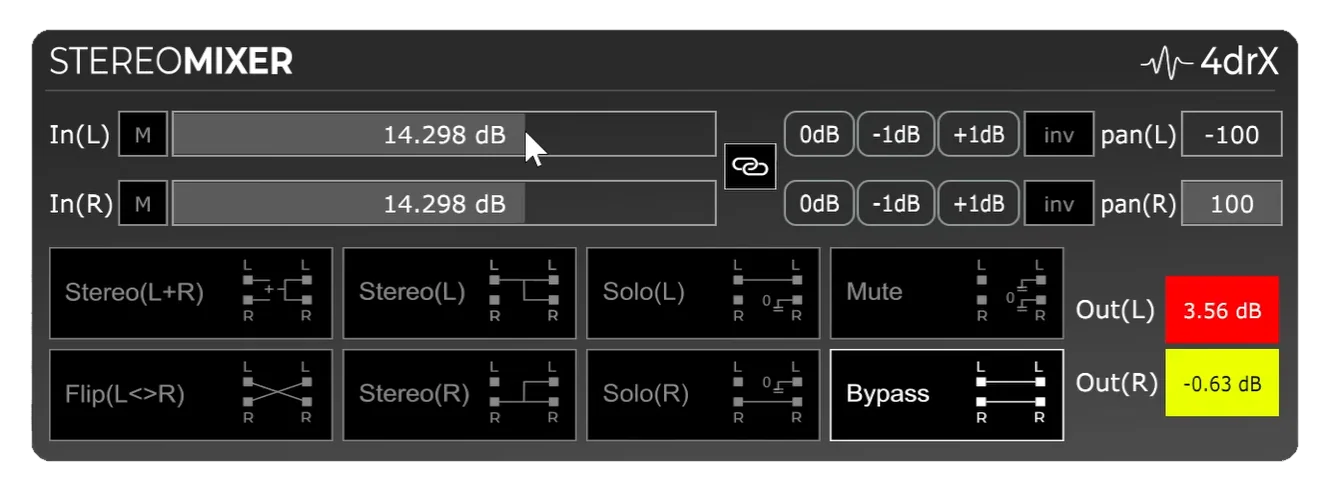
- One-click left and right channel solo modes let you focus on one side of a stereo source without editing the DAW pan control
- L+R mono mode combines both channels for fast mono checks, single-ear monitoring, and simple stereo-to-mono conversion
- Separate left and right gain sliders provide up to +/-48 dB of level adjustment for balancing uneven stereo material
- Large colored peak meters show left and right signal activity clearly so clipping is easier to catch during quick checks
- Channel invert buttons can subtract left and right material to reduce centered mono elements such as bass or drums
- Touch-friendly +/-1 dB buttons support precise gain tweaks without needing to drag the main sliders
Description
StereoMixer by 4drX is a stereo channel utility for fast left/right monitoring, mono checks, channel selection, and gain balancing. It is built for practical mix and practice workflows where you need to inspect or reshape a stereo signal without changing the track's DAW pan controls.
The plugin centers on one-click modes for soloing either side, combining both channels to mono, flipping channels, muting, bypassing, and subtracting channels with invert controls. Large left and right peak meters make it easier to spot clipping while the separate gain sliders cover broad level correction on each side.
StereoMixer is especially useful for backing tracks, reference material, and problem-solving tasks where the left and right channels carry different information. You can isolate an instrument, collapse a clip to mono, create a single-ear monitor feed, or use channel inversion to reduce centered material such as bass and drums.
The official 4drX page lists version 1.0.0, AAX, VST, and AU support, and compatibility with Windows 10+ and MacOS 11 Big Sur+. Download access is handled by an email form, with the newsletter checkbox marked optional.
Video Preview

Frequently Asked Questions
Is StereoMixer a stereo widener or an auto-panner?
No. StereoMixer is a utility for re-routing, monitoring, gain balancing, mono checks, and channel inversion rather than a modulation or stereo-enhancement effect.
Why would I use it instead of a DAW pan knob?
A normal pan knob usually changes track placement, while StereoMixer gives you dedicated modes for soloing one stereo side, summing to mono, flipping channels, and subtracting centered content. That makes it quicker for diagnostic and monitoring tasks.
Can StereoMixer help with backing tracks?
Yes. The official page specifically frames it around focusing on instruments that are placed on one side of a stereo backing track, and the mono and inversion modes can help create simpler practice-monitoring setups.
Does the download require an account?
The official page asks for an email address to send the download link.