A1StereoControl
Key Features
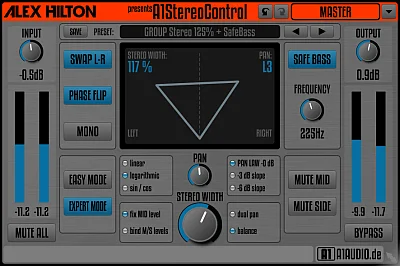
- Expands or limits the width of an existing stereo signal from one main control.
- Safe Bass recentres low frequencies below an adjustable threshold to keep the low end focused.
- Easy Mode provides direct width and pan control for quick stereo placement.
- Expert Mode adds 0 dB, -3 dB, and -6 dB pan laws plus linear, logarithmic, and sin/cos pan curves.
- Classic balance and dual-panning modes offer different ways to position an already-stereo signal.
- Phase flip, left-right swap, mono, and mid/side mute options help with fast stereo and mono checks.
- The developer lists linear-phase, zero-latency processing and full parameter automation.
Description
A1StereoControl is a stereo-width utility from A1AUDIO for narrowing or expanding an existing stereo signal, with a simple main width control and tools for deliberate left-right placement. It is designed for individual stereo tracks, groups, and master-bus work rather than for creating stereo from a mono source.
Its Safe Bass mode returns frequencies below a user-selected threshold to the centre, helping a wide mix retain a focused low end. That makes it particularly useful when pads, bass layers, or processed drums need more apparent width without spreading their lowest energy across the field.
Easy Mode keeps the workflow focused on width and pan, while Expert Mode adds selectable pan laws, pan curves, conventional balance, and dual-panning options. Phase flip, left-right swap, mono, mid mute, side mute, and gain controls make it practical as a compact stereo utility when checking a mix.
The developer describes the processing as linear phase and zero latency, and all parameters are automatable in a compatible host. A1StereoControl accepts stereo tracks only, so use a dedicated mono-to-stereo processor if the source needs stereo information created from scratch.
Frequently Asked Questions
What does Safe Bass do in A1StereoControl?
Safe Bass centres all bass frequencies below the threshold you set, returning that part of the signal to mono. It lets you adjust width above the cutoff while keeping low-frequency energy focused in the middle.
Can A1StereoControl turn a mono recording into stereo?
No. The developer states that A1StereoControl works only on stereo tracks, so it controls the width and placement of an existing stereo signal rather than generating a stereo image from a mono source.
What is the difference between Easy Mode and Expert Mode?
Easy Mode concentrates on the main width and pan controls. Expert Mode adds pan laws, pan curves, conventional balance, and dual-panning options for more detailed placement of the two channels.
Can I use A1StereoControl while checking mono compatibility?
Yes. The plug-in includes a mono option as well as phase flip, left-right swap, and mid/side mute controls, which can help you audition stereo decisions and identify channel-related issues without leaving the plug-in.