
Arminator 2

Key Features
- CS-80-inspired synthesizer with presets by Armin Kujat
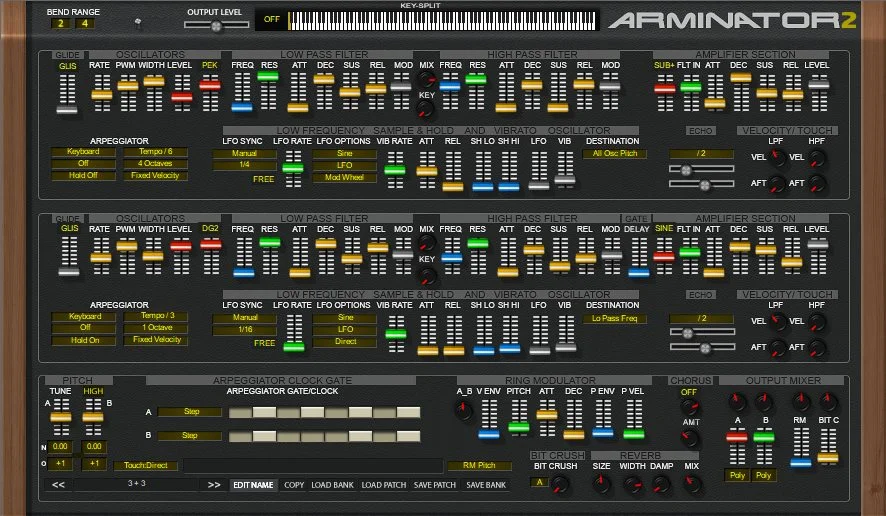
- Two oscillator paths with high-pass and low-pass filtering and envelopes
- Filter key tracking and an adjustable keyboard split
- Keypress-synced LFO and selectable sub-octave sine oscillator
- Independent mono or poly settings for each line
- Chorus and a delay for the second line’s envelopes
Description
Arminator 2 is a Windows VST synthesizer by Krakli Software inspired by the Yamaha CS-80. It aims for sounds that evoke the original instrument rather than a faithful recreation, with presets by Armin Kujat to explore its character.
The synth is suited to broad pads, brass and strings, with a panel that puts its sound-shaping controls close together. Its two oscillator paths provide high-pass and low-pass filtering and envelopes, while velocity and aftertouch controls offer expressive options for performance.
Version 2 adds filter key tracking and a key split that can be placed across the ten-octave range. The LFO can restart with a keypress, the line amp sine oscillator can act as a sub oscillator, and each line can be set to mono or poly operation.
A chorus joins the instrument’s effects, and the second line’s envelopes can be delayed after a note starts to create evolving layers. The interface is compact and may be difficult to read on a high-resolution display, so allow time to get familiar with its densely packed controls.
Arminator 2 is a 32-bit Windows VST, so check that your host supports 32-bit plugins or use compatible bridging software. One user has also reported project reload and preset inconsistencies in a bridged setup, making a compatibility test sensible before relying on it in a session.
Frequently Asked Questions
Is Arminator 2 an exact model of the Yamaha CS-80?
Krakli describes it as a homage rather than a faithful emulation. Its patches aim to suggest the character of the original instrument.
Can I use Arminator 2 in a 64-bit DAW?
The plugin itself is 32-bit. A compatible bridge may allow a 64-bit host to load it, but test the combination before using it in an important project.
What does the second line envelope delay do?
It delays the second line’s envelopes after a keypress by up to 500 ms. This can make the second layer arrive after the first.


