
Key Features
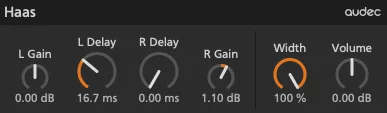
- Adjust left and right channel delay times independently
- Balance each channel with separate gain controls
- Shape the stereo image with a dedicated width knob
- Set the processed output level with the volume control
- Fine-tune knob settings by holding Shift while dragging
- Reset individual knobs with a double-click
Description
Haas by Audec is a stereo delay effect that lets you adjust the timing and level of the left and right channels independently. Its compact interface also provides width and output volume controls for shaping the resulting stereo image.
The separate delay knobs make it easy to introduce a small timing difference between channels. These offsets can change the perceived position and width of a sound, making the plugin useful for experimenting with spatial placement on individual tracks.
Independent left and right gain controls let you rebalance the channels while you work. The width control provides another way to adjust the stereo presentation, and the volume control sets the output level.
Try the effect on a synth, guitar, or vocal layer when a part needs a different position in a busy arrangement. Listen in mono as well as stereo: combining channels with different delays can change the tone of the result.
For precise adjustments, hold Shift while dragging a knob; double-click a control to reset it. Audec lists 64-bit VST3 and AU support on macOS and VST3 support on Windows, with the download available from the developer’s product page.
Frequently Asked Questions
How does Haas change stereo placement?
It delays the left and right channels separately. Small timing differences can shift the perceived position or spread of a sound.
Can I adjust the two channels independently?
Yes. Haas has separate delay and gain controls for the left and right channels, alongside width and output volume controls.
Should I check the result in mono?
Yes, especially when using noticeable channel delays. Summing delayed channels can change the tone, so compare the sound in both stereo and mono.
How do I make fine adjustments or reset a control?
Hold Shift while dragging a knob to fine-tune it. Double-click the knob to restore its default value.


