Aurora
Key Features
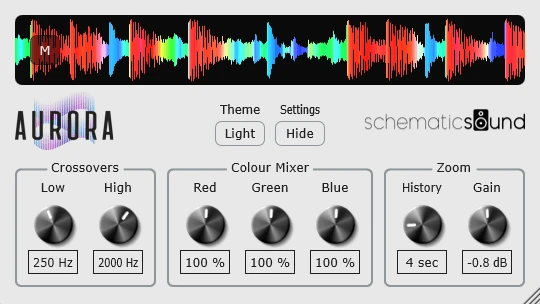
- RGB waveform display separates low, mid, and high frequency content so balance changes are visible over time.
- Adjustable low and high crossover controls help focus the color response on sub-bass, vocal brightness, cymbals, or upper harmonics.
- Color mixer controls change how much each frequency band contributes to the final waveform display.
- History and gain controls let producers zoom the visual timing and vertical waveform size without changing audio output.
- Compact mode can hide the controls and reduce the plugin footprint for sessions where analyzers need to stay open.
- Version 1.1.0 adds dark theme support, mono L+R mode, click-to-pause waveform scrolling, and removes licensing activation.
Description
Aurora by Schematic Sound is a DAW waveform visualizer that brings DJ-style frequency-colored scrolling waveforms into a VST3 or AU plugin window. It splits the incoming signal into low, mid, and high bands, then blends those bands into an RGB waveform so arrangement changes, bass weight, bright transients, and dense sections are easier to read at a glance.
The plugin is strongest as a production utility rather than a corrective analyzer. You can keep it open while writing or mixing, hide the controls when space is tight, and use the history length, gain, crossover, and color controls to focus the display on the part of the spectrum that matters for the track.
Version 1.1.0 adds a dark theme, a mono L+R waveform mode, and click-to-pause waveform scrolling during playback. Schematic Sound also removed the licensing and activation system, and the official Moonbase product metadata now lists Aurora as a free product with open downloads for macOS and Windows.
The source article frames Aurora as useful because colored DJ waveforms reveal frequency balance differently from a standard waveform or spectrum analyzer. For producers who bounce audio just to inspect it in DJ software, Aurora keeps that visual feedback inside the DAW.
Frequently Asked Questions
Does Aurora process or change the audio?
Aurora is a visualizer, not an audio effect. Its gain, crossover, color, and history controls change the display behavior so you can inspect the signal without altering the sound passing through the track.
How is Aurora different from a normal waveform view?
A standard waveform mainly shows amplitude over time. Aurora adds frequency-color information, with low, mid, and high bands blended into the display so you can spot bass-heavy, midrange-heavy, or bright sections while the session plays.
Can Aurora replace a spectrum analyzer?
It is better treated as a fast visual composition and arrangement aid. A detailed spectrum analyzer is still better for precise frequency measurements, but Aurora gives a more immediate overview of how energy changes across a track.
Is the current version open source?
Yes. The official page links to the public GitHub repository, and the version 1.1.0 notes say the licensing and activation system was removed now that Aurora is open source and pay-what-you-want.