
HEADPHONE LAB
Key Features
- Combines headphone frequency-response correction with speaker-style virtual monitoring, so one plugin handles both tonal cleanup and translation checking on supported Beyerdynamic models
- Uses crossfeed, HRTF-based spatial cues, and adjustable virtual speaker angles to pull mixes out of the hard left-right headphone bubble and closer to monitor playback
- Lets you dial in ear spacing, head circumference, and room amount for a more believable listening perspective instead of relying on one fixed binaural preset
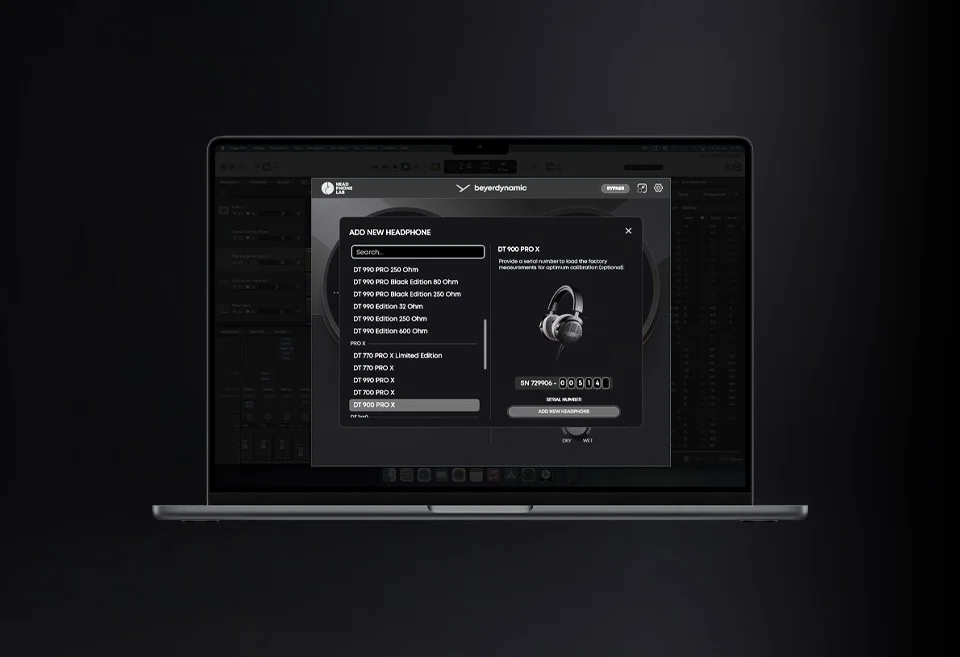
- Offers FACTORY CALIBRATION on select DT models by loading the original production measurement data for the exact headphone unit tied to your serial number
- Keeps the room simulation intentionally restrained, with Beyerdynamic emphasizing an ear-friendly approach that avoids narrow-band filters and phasey, reverb-heavy coloration
- Fits cleanly into modern DAW workflows because you can insert it on a headphone or master bus, switch between calibrated and pure headphone playback, and leave it running in the background
Description
HEADPHONE LAB is a headphone-calibration and virtual-monitoring plugin from Beyerdynamic that turns supported DT studio headphones into a more mix-ready reference. Instead of only flattening tonal balance, it also recreates a speaker-style monitoring perspective so pan, depth, and translation checks feel closer to working on monitors.
The core workflow combines two jobs: frequency correction for supported Beyerdynamic models and loudspeaker emulation with crossfeed, HRTF-based spatial cues, and optional room simulation. You can fine-tune ear spacing, head circumference, speaker angles at 40, 60, or 80 degrees, and the room amount, then leave the plugin running on a headphone bus while you mix.
Where it moves beyond a generic crossfeed utility is FACTORY CALIBRATION on supported models such as DT 700 PRO X, DT 900 PRO X, DT 1770 PRO MKII, and DT 1990 PRO MKII, which loads measurement data from the exact serial-numbered unit. Beyerdynamic also says the room model stays deliberately subtle and avoids reverb-heavy processing or narrow-band filters, so the plugin aims for realism and low-fatigue decision making rather than flashy showroom effects.
That focused approach lines up with third-party coverage, which praises how close it gets to speaker listening without the washed-out ambience or heavy CPU hit some room simulators add. As of April 18, 2026, Beyerdynamic's own FAQ still says the current version is permanently free, but the download is delivered through a short registration form rather than an open public ZIP.
Video Preview


Frequently Asked Questions
Does HEADPHONE LAB work with non-beyerdynamic headphones?
No. Beyerdynamic's support FAQ says HEADPHONE LAB is compatible with current beyerdynamic DT studio headphones and the DT-series in-ear models, so it is not a universal calibration plugin for third-party headphones.
Do I need an account or online activation to use it?
Beyerdynamic says no online activation is required. You still have to complete a short registration to receive the download link, but the FAQ explicitly says an account is not required.
What is FACTORY CALIBRATION and who gets it?
FACTORY CALIBRATION uses the original production measurement data from your exact headphone unit instead of a generic golden-sample profile. Beyerdynamic says it is available for DT 700 PRO X, DT 900 PRO X, DT 1770 PRO MKII, and DT 1990 PRO MKII.
How do you set it up in a DAW?
Beyerdynamic recommends inserting HEADPHONE LAB on the channel that feeds your headphone output, such as a dedicated headphone bus or the master bus. From there you choose the headphone model, enable calibration, turn on speaker emulation, and switch back to pure headphone playback whenever you want a direct reference check.
Which room amount is supposed to translate best?
Beyerdynamic's FAQ recommends the Room setting at 50% as the most realistic, controlled reference. Dry at 0% is virtually reflection-free, while Wet at 100% is intended for a larger and more spacious monitoring scenario.


