
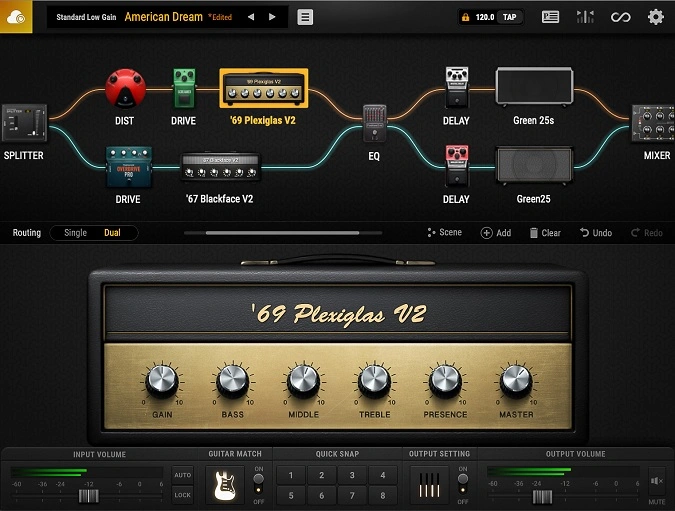
BIAS FX 2 LE
Key Features
- 15 amp models covering clean, crunch, and high-gain channels based on legendary real-world amplifiers
- 22 effect pedals and rack processors spanning overdrive, distortion, modulation, delay, and reverb categories
- Guitar Match Essential technology that digitally recreates the tonal character of two target guitar models from a single instrument
- Dual signal path architecture for blending or switching between two amp and effects chains simultaneously
- Integrated looper and recorder for layered practice sessions, songwriting, and quick demo tracking
- Drag-and-drop interface with Live View and Pedalboard View for intuitive signal chain building
- 24 factory presets providing genre-spanning starting points from jazz cleans to modern metal
Description
BIAS FX 2 LE by Positive Grid is a streamlined guitar and bass amp simulation suite that packs 15 amps, 22 effects, and 24 factory presets into a drag-and-drop interface. It delivers the same DSP engine found in the paid BIAS FX 2 lineup, giving guitarists access to convincing clean, mid-gain, and high-gain tones modeled after iconic amplifiers like the Marshall JCM800, Mesa Boogie Dual Rectifier, Vox AC30, and Roland JC120.
The standout feature is Guitar Match Essential, which analyzes your instrument and digitally recreates the tonal characteristics of two target guitars without any hardware modifications. Paired with the integrated looper and recorder, it turns a basic audio interface setup into a self-contained practice and writing rig.
The signal chain supports dual paths so you can blend clean and overdriven channels or switch between them in real time. Effects cover the essentials: overdrive, distortion, modulation, delay, and reverb pedals plus rack processors that slot into the chain anywhere you like.
Cab modeling is serviceable but considered the weakest link by experienced users, who often pair BIAS FX 2 LE with a dedicated IR loader for tighter low-end and more realistic speaker response. Synth and keyboard players also find the amp models useful for adding tube-style coloration to electronic sources.
BIAS FX 2 LE runs as a plugin (VST, AAX, AU) or standalone on macOS 10.14 and up (Intel or Apple Silicon via Rosetta) and Windows 10 or later. An internet connection is required for initial license activation, after which it works offline.
Video Preview


Tips
- Experiment with different amp and cabinet combinations to find your unique sound.
- Use the Guitar Match feature to simulate different guitar models and expand your tonal palette.
- Take advantage of the integrated looper to create layered guitar tracks and practice solos.
- Utilize the dual signal path to blend clean and distorted tones for a richer sound.
- Save your favorite presets and organize them for quick access during live performances.
- Explore the factory presets to get a feel for the plugin's capabilities and find inspiration for your own settings.
- Regularly update the plugin to benefit from new features and improvements.
Frequently Asked Questions
Does BIAS FX 2 LE work on Apple Silicon Macs natively?
BIAS FX 2 LE runs on Apple Silicon Macs through Rosetta 2 translation, not as a native ARM build. Performance is still smooth on M-series processors, but you may need to open your DAW in Rosetta mode for it to load correctly.
Can I use third-party impulse responses with BIAS FX 2 LE?
The LE version does not include a built-in IR loader, but you can bypass its cab section and route the output into a separate IR loader plugin. Many users pair it with a dedicated cab sim for tighter speaker emulation, especially for high-gain tones.
How does Guitar Match work and how many guitars are included?
Guitar Match analyzes the frequency response and dynamic behavior of your physical guitar, then applies a correction curve to simulate a different target instrument. The LE edition includes Guitar Match Essential with two target guitar models.
Is an internet connection required every time I open BIAS FX 2 LE?
An internet connection is needed only for the initial license activation. After that, the plugin works fully offline. You will also need connectivity if you want to browse ToneCloud presets shared by other users.


