
Bjorn

Key Features
- Fourteen filter types collected from Fanan Team tools
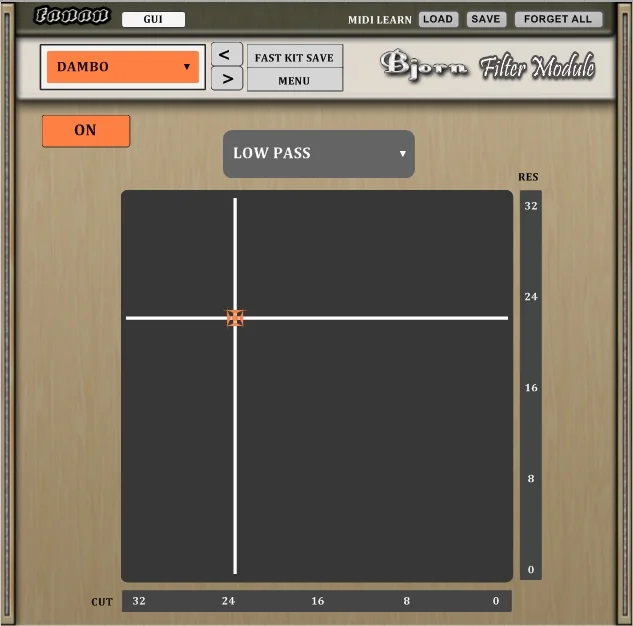
- X/Y pad controls cutoff and resonance together for live sweeps
- Low-pass, high-pass, band-pass and band-reject responses
- State-variable filter types add further tonal options
- MIDI learn support where available in the host
- CPU-friendly and latency-free operation according to the developer
Description
Bjorn by Fanan Team is a multimode filter effect with 14 filter types and an X/Y pad for shaping audio in real time. It brings filters drawn from the developer’s other tools into a single interface for performance and sound design.
The pad combines cutoff frequency and resonance control, letting you change both together as you move around the display. This makes it useful for sweeping a synth line, reshaping a drum loop or creating transitions while a track plays.
Its selection includes familiar low-pass, high-pass, band-pass and band-reject responses alongside state-variable filters. Switching between types gives you different ways to emphasize or remove parts of a sound without changing to another effect.
MIDI learn is supported where the host allows it, offering another way to control the filter during a performance. A compatible X/Y controller can make the two-dimensional control more tactile than using a mouse.
Fanan Team describes Bjorn as CPU friendly and latency free, making it a practical candidate for live filtering or use across a session. The developer lists Windows 32-bit and 64-bit VST builds; check your host’s support for the format before installing.
Frequently Asked Questions
What does the X/Y pad control?
It controls cutoff frequency and resonance together. Moving across the pad lets you shape both parameters during a performance.
Can Bjorn be controlled with MIDI?
The release announcement lists MIDI learn where supported. A compatible X/Y controller can provide hands-on control of the pad.
Which kinds of filters are included?
Bjorn offers 14 filter types, including low-pass, high-pass, band-pass, band-reject and state-variable options. Try different types to hear how they change the response of a sound.


