
Casetera
Key Features
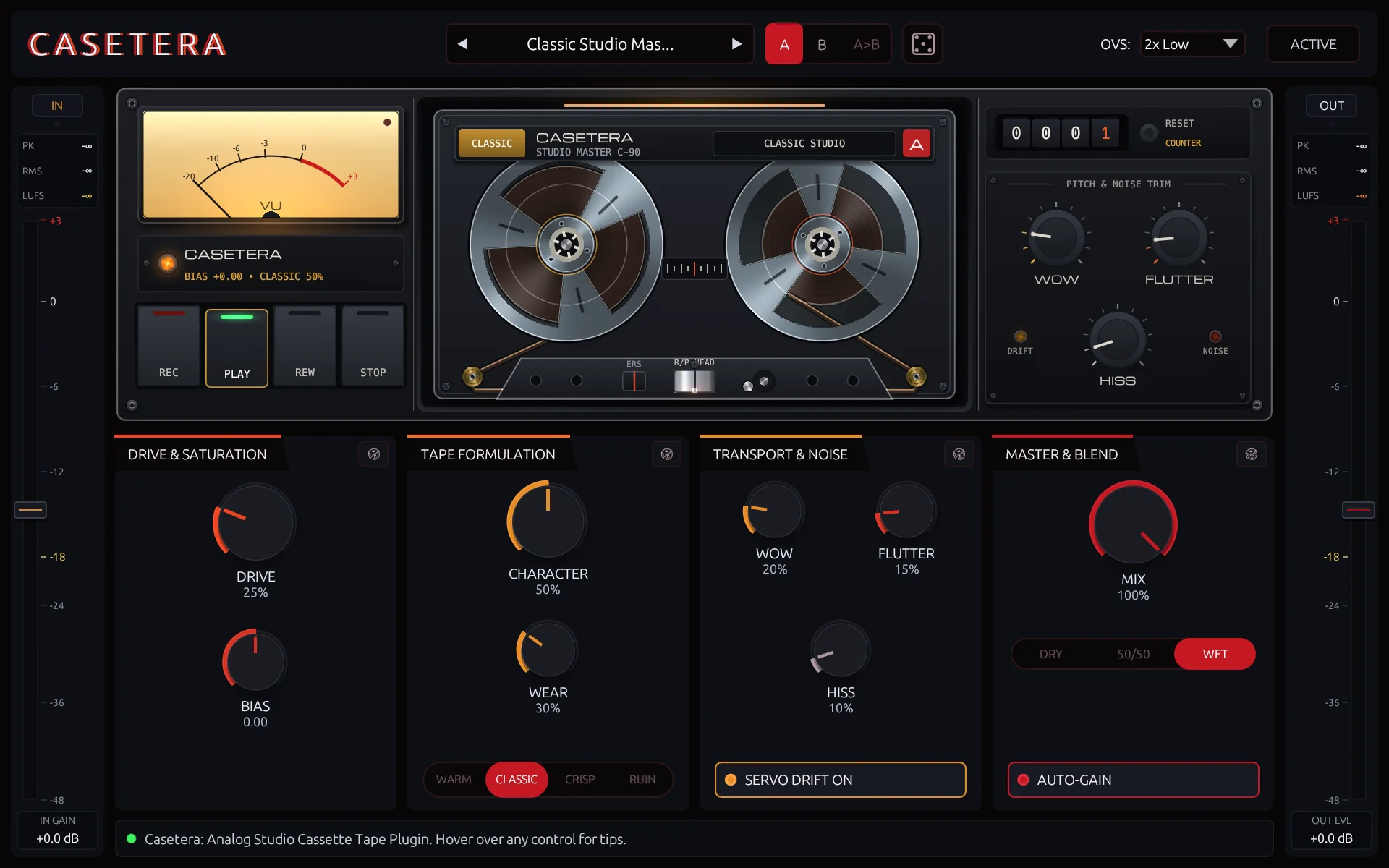
- Four tape formulations—Warm, Classic, Crisp, and Ruin—cover thicker cassette color, balanced studio tone, cleaner headroom, and heavily worn lo-fi texture.
- Drive and Bias controls shape the tape saturation from mild harmonic warmth to more obvious vintage crunch.
- Character and Wear adjust the intensity and age of the selected tape formulation for quick moves between fresh and degraded tone.
- Independent Wow, Flutter, and Hiss controls add slow drift, faster pitch wobble, and cassette noise, with a servo-lock option for stable pitch.
- Auto-Gain and Dry/50-50/Wet blend choices support level-matched auditioning and parallel tape processing.
- A/B slots, per-module and global randomizers, and 25 built-in presets speed up experimentation and recall.
Description
Casetera is a cassette and studio-tape effect from Carbon Fiber Plugins that combines saturation, tape-stock color, wear, pitch movement, and noise in one interface. Its four tape formulations let it move between fuller analogue-style glue and deliberately damaged cassette character without building a separate chain of processors.
Drive and Bias supply the main harmonic color, while Character and Wear control how strongly the selected tape formulation affects the signal. Warm, Classic, Crisp, and Ruin give producers distinct starting points, from thicker low-end emphasis and balanced studio color to cleaner headroom or chewed-up lo-fi texture.
Wow, Flutter, and Hiss add independent transport-style movement and noise, while the servo-lock option keeps the pitch steady when only the tonal effect is wanted. Auto-Gain, dedicated Dry/50-50/Wet choices, A/B comparison, randomizers, and 25 built-in presets make it practical for fast sound design as well as repeatable mix decisions.
Casetera supports VST3, AU, and CLAP on Windows 10/11 and macOS 10.15 or later for Apple Silicon and Intel systems. The complete plug-in is permanently $0 with no DRM or online DAW authorization, though its installer is delivered after creating a free Carbon Fiber account with the newsletter activated.
Video Preview

Frequently Asked Questions
What do the four Casetera tape formulations do?
Warm is positioned for thicker ferric-style low-end weight and smoother highs, while Classic is the more balanced studio option. Crisp aims for higher headroom and articulate transients, and Ruin is the degraded setting for narrower, worn, and more damaged cassette character.
Can I add tape color without pitch wobble?
Yes. Casetera provides separate Wow and Flutter controls, plus a servo-lock option that keeps the motor speed steady. That makes it possible to use the saturation, tape formulation, and noise controls without adding audible pitch movement.
Does Casetera include parallel processing controls?
Yes. Alongside its Mix control, the plug-in provides Dry, 50-50, and Wet choices. These make it easy to compare the processed signal with the original or retain some dry transient detail while adding tape texture.
How is Casetera downloaded and authorized?
The official product page says Casetera is permanently $0 and has no DRM or online DAW authorization. Downloading the installers requires a free Carbon Fiber Plugins account with the newsletter activated, then the plug-in can run without a serial key or online check-in inside the DAW.


