
Clipmax
Key Features
- Hard and brickwall clipping with a ceiling threshold adjustable down to -24 dB
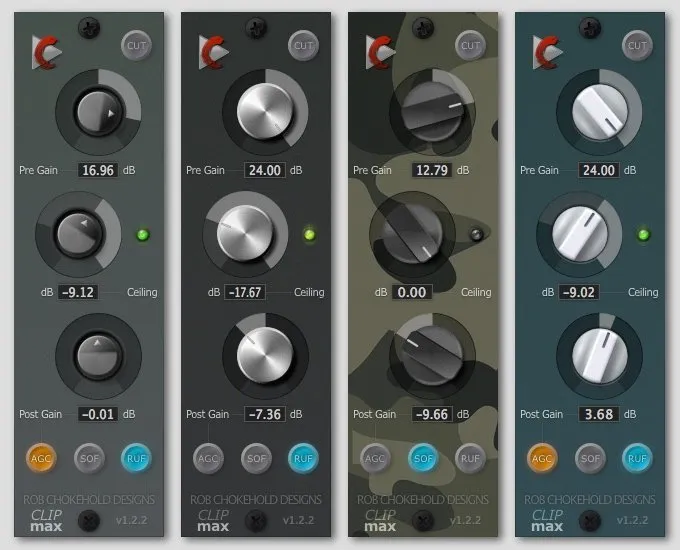
- Three clipping modes: default hard clip, SOF (soft saturation), and RUF (rough) for different tonal characters
- Automatic gain compensation (AGC) that preserves natural perceived loudness during clipping
- Real-time LED metering shows clipping intensity alongside the ceiling knob
- Pre Gain and Post Gain controls for precise signal staging before and after the clipper
- Extremely low CPU usage suitable for use across multiple tracks in a session
- Skinnable interface with support for custom GUI themes
Description
Clipmax by Chokehold is a hard clipping and brickwall limiting plugin built for taming peaks or driving signals into aggressive distortion. It runs as a native 32-bit and 64-bit plugin on macOS and Windows in AU, VST2, and VST3 formats.
The interface centers on three core controls: Pre Gain to boost or attenuate the signal before clipping, a Ceiling knob that sets the clipping threshold down to -24 dB, and Post Gain for final output adjustment. An LED indicator next to the Ceiling knob shows how much clipping is being applied in real time.
AGC (automatic gain compensation) maintains a natural perceived volume level even under heavy clipping, rather than simply maximizing the output. This makes it easy to A/B the effect without large volume jumps.
Version 1.2.2 introduced two additional clipping modes beyond the default hard clip. SOF (soft) mode pushes the signal into saturation that is difficult to clip outright, producing a mellower high end well suited to guitars and vocals.
RUF (rough) mode adds a secondary clipping stage before the main ceiling, creating a more aggressive, gritty character. Both modes expand Clipmax well beyond basic peak limiting into creative sound-shaping territory.
The plugin excels at shaping transient-rich material like drums, where subtle peak clipping adds punch without audible artifacts. CPU usage is minimal, and the skinnable interface supports custom GUI themes.
Video Preview

Frequently Asked Questions
What is the difference between the three clipping modes in Clipmax?
The default mode is a standard hard/brickwall clipper that cuts peaks at the ceiling threshold. SOF (soft) mode applies saturation that rolls off the high end more gently, making it better suited for guitars and vocals. RUF (rough) mode adds a secondary clipping stage before the main ceiling for a more aggressive, gritty result.
What does the AGC button do in Clipmax?
AGC stands for Automatic Gain Compensation. It calculates make-up gain to maintain a natural perceived volume level similar to the un-clipped source signal. This prevents the output from simply being maximized to 0 dB and makes it easier to compare the clipped and unclipped signals at matching volumes.
Can Clipmax be used for mastering as well as mixing?
Yes. With subtle ceiling settings and the default or SOF mode, Clipmax can transparently shave peaks off a master bus to gain a few dB of loudness without audible distortion. For more creative mastering applications, the RUF mode offers a more colored, aggressive result.
Does Clipmax support VST3 format?
Yes. Clipmax is available in AU, VST2, and VST3 formats for both 32-bit and 64-bit hosts on macOS and Windows.


