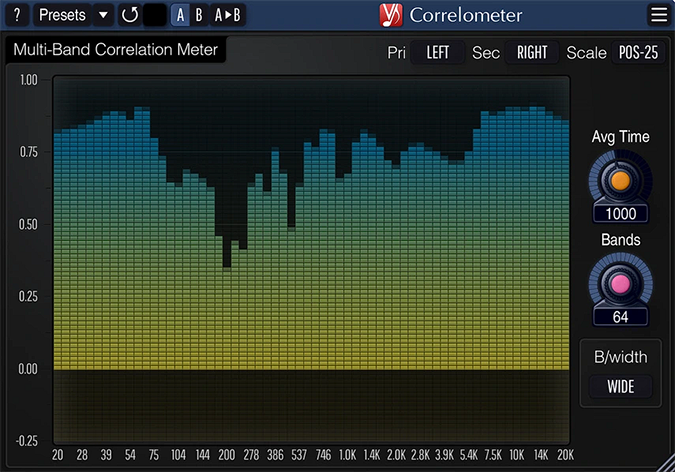
Correlometer
Key Features
- Displays 4 to 64 spectral bands simultaneously, revealing per-frequency phase issues that a single broadband meter would average away
- Adjustable band quality factor controls selectivity from broad overview to narrow-band investigation of specific problem areas
- Side-chain input routes any two tracks through the meter for direct cross-track phase comparison without re-routing your session
- Variable averaging time lets you switch between fast transient response and smoother long-term correlation readouts
- Zero processing latency and 64-bit floating-point engine ensure accurate, real-time metering without affecting your signal chain
- Resizable interface with Retina/HiDPI support and multiple color schemes fits any screen layout and studio aesthetic
- Native Apple Silicon support with compatibility across macOS 10.12+ and Windows XP+ in VST, VST3, AU, and AAX formats
Description
Correlometer by Voxengo is a multi-band correlation meter plugin that reveals phase problems your ears alone would miss. Unlike a standard broadband correlation meter, it splits the signal into 4 to 64 individual spectral bands, making it easy to spot out-of-phase content hiding in the mids and highs that can quietly erode mix clarity.
The plugin is based on the correlation engine from Voxengo's paid PHA-979 phase-alignment tool, giving it a professional-grade measurement core. Each band's selectivity is controlled by an adjustable quality factor, so you can scan broadly or zero in on a narrow frequency range where you suspect issues.
Side-chain input support makes Correlometer especially practical for real-world alignment tasks. You can route a bass amp and its DI track, a close mic and room mic, or any two related signals and instantly see their per-band correlation — far more informative than listening for comb filtering by ear alone.
Averaging time is fully adjustable, letting you choose between fast transient tracking and a smoother long-term readout. The interface is resizable, supports Retina and HiDPI displays, and includes multiple color schemes, so it integrates cleanly into any mixing or mastering session.
Voxengo has maintained Correlometer through 19 major releases, and the plugin runs with zero latency and 64-bit floating-point processing at any sample rate. It is one of the most consistently recommended metering tools in mixing and mastering communities for diagnosing stereo phase coherence.
Frequently Asked Questions
What is the difference between a broadband correlation meter and a multi-band one?
A broadband correlation meter shows a single value representing the overall phase relationship between left and right channels. This can mask problems in specific frequency ranges — for example, your low end might be perfectly in phase while your highs are cancelling. Correlometer's multi-band display shows correlation per frequency band, so you can pinpoint exactly where the issue sits.
How do I use the side-chain input to compare two separate tracks?
Route the first signal into Correlometer's main input and the second signal into its side-chain bus. The meter then displays the per-band correlation between the two sources instead of between the left and right channels of a single stereo track. This is ideal for aligning bass amp and DI recordings, close and room mics, or any two signals that should be phase-coherent.
Does Correlometer add latency to my signal chain?
No. Correlometer operates with zero processing latency, so it will not shift your audio or introduce delay compensation issues. It is a pure metering tool that reads the signal without altering it.
What does the band quality factor setting actually control?
The quality factor (Q) determines how narrow or wide each spectral band is. A low Q gives you broad, overlapping bands for a quick overview of your mix's phase health. A high Q narrows each band, letting you isolate a specific frequency range where you suspect phase cancellation — useful when you know roughly where the problem is and need precise confirmation.