
DD Reverb
Key Features
- Algorithmic reverb engine provides efficient room and ambience processing for Windows VST2 hosts.
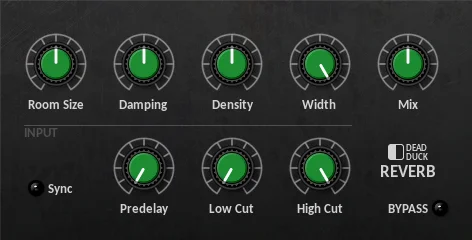
- Room Size control moves from small simulated spaces to larger reverb environments.
- Damping and Density controls shape how bright, smooth, and full the reverb tail feels.
- Stereo Width adjusts how wide the reverberated space appears in the mix.
- Syncable pre-delay can run freely up to 1 second or lock to tempo divisions from 1/32T to 1/4.
- Low-cut and high-cut input filters keep unwanted lows or harsh highs out of the reverb effect.
- Simple mix control makes it usable on inserts or send-style effect tracks.
Description
DD Reverb is a Windows VST algorithmic reverb from Dead Duck Software's Free Effects bundle. It focuses on practical room and ambience shaping with pre-delay, stereo width, damping, density, wet/dry mix, and input filtering in one compact interface.
The control layout is direct enough for bread-and-butter mixing jobs. Room Size changes the simulated space, Damping dulls the reflections, Density controls how full the tail feels, and the low-cut and high-cut filters shape what enters the reverb before the tail is generated.
Its strongest role is fast spatial placement rather than deep cinematic sound design. Use it when vocals, guitars, keys, drums, or synth parts need a simple room or plate-like wash without loading a larger modern reverb suite.
User feedback around Dead Duck effects is split in a useful way: some producers praise the bundle for low-friction everyday mixing, while others describe DD Reverb as plain compared with more characterful reverbs. That makes it best treated as a lightweight Windows utility reverb, especially for older VST2 sessions and quick project sketches.
Frequently Asked Questions
What kind of reverb is DD Reverb?
The developer describes it as an efficient algorithmic reverb with pre-delay and input filtering. It is a general-purpose room and ambience effect rather than a convolution reverb or a modeled hardware plate.
Can DD Reverb sync its pre-delay to the project tempo?
Yes. The official documentation lists a Sync switch for pre-delay, letting it change from a free timing range up to 1 second to tempo divisions from 1/32T to 1/4.
Where do the low-cut and high-cut filters sit in the signal path?
Dead Duck Software states that the low and high cut filters process the input signal before it is passed into the reverb effect. That makes them useful for preventing boomy lows or sharp highs from feeding the tail.
Is DD Reverb a good choice for modern macOS or VST3 sessions?
No. The official Dead Duck Free Effects documentation identifies the bundle as Windows VST2 software supplied as 32-bit and 64-bit DLL files, so it is aimed at Windows DAWs with VST2 support.


