
Denoiser
Key Features
- Zero-latency processing with no FFT artifacts, operating entirely in the time domain for clean, phase-transparent noise reduction
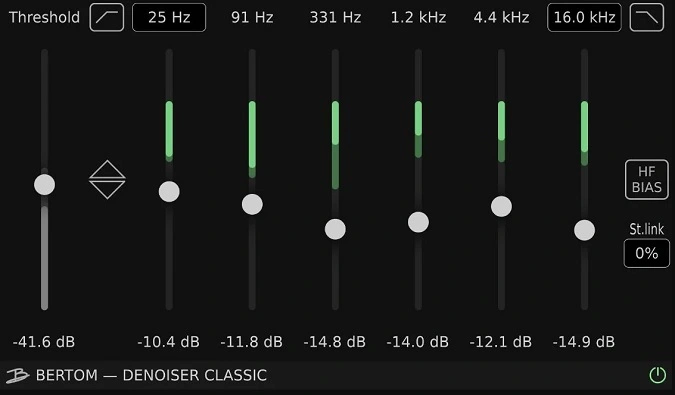
- Six adjustable frequency band sliders with individual control over noise reduction depth across the spectrum
- Dynamic noise tracking algorithm that adapts to evolving noise without requiring a static noise profile or learn phase
- Built-in high-pass and low-pass filters plus HF Bias for targeting specific noise frequencies like hiss or hum
- Extremely low CPU usage allowing multiple instances across a session without performance impact
- Fully automatable parameters for dynamic noise reduction that adjusts throughout a track or broadcast
- Cross-platform support with native Apple Silicon compatibility, covering macOS 10.13+, Windows 7+, and Linux
Description
Denoiser Classic by Bertom Audio is a zero-latency noise reduction plugin for music production, post-production, and live broadcast use. It removes unwanted background noise including hiss, hum, buzz, and room tone from audio recordings without the artifacts associated with FFT-based processing.
The plugin operates in the time domain using a dynamic noise reduction algorithm that continuously tracks how the noise portion of the signal evolves in each frequency band. This approach works similarly to a dynamic equalizer, producing no apparent phase shift when noise reduction is inactive.
The interface features a threshold slider alongside six frequency band sliders for adjusting reduction depth across different ranges. High-pass and low-pass filters let you isolate specific problem frequencies, while an HF Bias control targets high-frequency noise with additional precision.
All controls are fully automatable, making Denoiser well-suited for projects where noise levels change over time. A Link control moves all band sliders simultaneously for quick global adjustments.
Professional users frequently praise Denoiser for its transparent sound quality and remarkably low CPU usage. One professional dialogue editor compared its zero-latency noise suppression to hardware units costing thousands more, noting it cleans the signal without the telltale spectral smearing of FFT-based tools.
Denoiser Classic is available under a pay-what-you-want model in VST3, AU, and AAX formats for macOS, Windows, and Linux. Bertom Audio also offers Denoiser Pro ($25) with per-band thresholds and an adaptive mode for more complex noise profiles.
Video Preview


Tips
- Use Denoiser before applying compression to avoid amplifying background noise.
- Adjust the high-pass and low-pass filters to target specific noise frequencies.
- Use the Link control to move all frequency band sliders simultaneously for quick adjustments.
- Start with moderate noise reduction settings to avoid introducing artifacts.
- Experiment with the Threshold slider to find the best balance between noise reduction and audio quality.
- Combine Denoiser with a gate/expander for a more professional result.
- Utilize the fully automatable feature to create dynamic noise reduction settings throughout your track.
Frequently Asked Questions
Does Denoiser Classic require a noise profile or learn phase?
No. Unlike most noise reduction plugins that require you to capture a noise sample first, Denoiser Classic uses a dynamic algorithm that continuously tracks how the noise evolves in each frequency band. You simply set the threshold and adjust the band sliders to taste.
What is the difference between Denoiser Classic and Denoiser Pro?
Denoiser Classic is pay-what-you-want (including free) and includes all the core noise reduction features. Denoiser Pro costs $25 and adds individual per-band thresholds and an adaptive mode, which helps when noise levels change significantly over time.
Can Denoiser be used for live performances and broadcasts?
Yes. Denoiser operates with true zero latency, making it suitable as an insert effect during live performances and real-time broadcasts. Its low CPU usage also ensures it won't cause audio dropouts in demanding live situations.
How does Denoiser compare to FFT-based noise reduction plugins?
Denoiser works in the time domain rather than using Fast Fourier Transform processing. This means it avoids the spectral smearing and phasing artifacts that FFT-based tools can introduce, though it may be less effective for extremely heavy noise reduction where spectral editing is needed.


