
DigiDestroy

Key Features
- Bit depth reduction from 3 to 16 bit for everything from light digital dirt to near-demolished audio
- Sample-rate reduction with up to 65 steps for gritty downsampling, retro tones, and fragmented textures
- Anti-aliasing high-cut filter for taming harsh upper frequencies after sample-rate reduction
- Gain-compensated digital clipper with Hard mode in the freeware edition for extra edge without a big level jump
- Dry/wet control for parallel processing when you want crushed texture blended under the clean signal
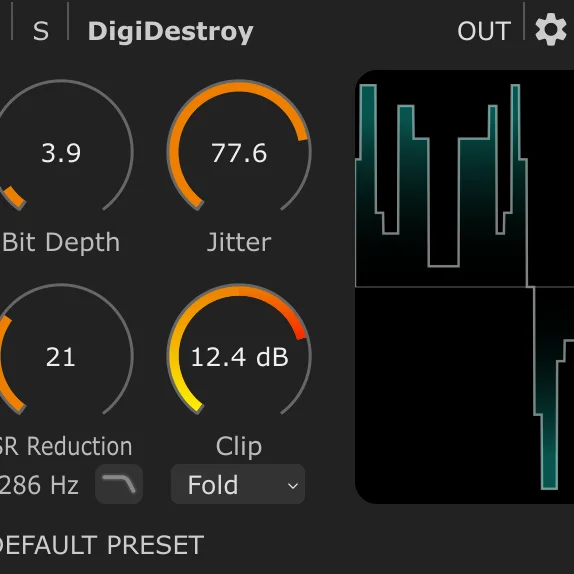
- Schematic display that visualizes the processing path and makes detailed bitcrushing adjustments easier to read
Description
DigiDestroy is a HOFA SYSTEM bitcrusher for controlled digital degradation, from subtle sampler grit to crushed, broken-down effects. The freeware edition keeps the core bit-depth reduction, sample-rate reduction, anti-aliasing high-cut filter, and hard clipping controls, so it covers the main lo-fi toolkit without turning into a sprawling multi-effect.
The plugin is strongest when you want precise destruction rather than random glitch chaos. Bit depth runs from 3 to 16 bit, sample-rate reduction reaches 65 steps, and the schematic display makes it easy to see how the processing is reshaping the signal while you blend the result in parallel with dry/wet.
HOFA reserves some of the more aggressive extras for the paid version, including jitter and the Fold and Wrap clip modes. That makes the freeware version a focused choice for crunchy drums, retro game textures, cinematic sound design, and transitions where hard digital edges matter more than analog-style saturation.
DigiDestroy runs inside the HOFA SYSTEM platform and is installed through HOFA-Plugins Manager. That extra manager step is the main tradeoff, but users already working with HOFA tools get a clean, utility-first bitcrusher that works as a standalone plugin or inside larger SYSTEM chains.
Frequently Asked Questions
What is included in the DigiDestroy freeware edition?
The freeware edition includes bit depth reduction from 3 to 16 bit, sample-rate reduction from 1 to 65 steps, an anti-aliasing high-cut filter, clip amount control, Hard clipping mode, and dry/wet blending. HOFA keeps jitter plus the Fold and Wrap clip modes for the paid full version.
Can DigiDestroy be used outside the HOFA SYSTEM modular host?
Yes. BPB notes that HOFA SYSTEM modules can be used as standalone plugins in a DAW, while the broader SYSTEM platform lets users combine modules into more complex chains.
What kind of sounds does DigiDestroy work best on?
DigiDestroy is useful on drums, synths, effects, transitions, and sound design layers that need obvious digital artifacts. Its controls lean toward precise bitcrushing and sample-rate degradation rather than randomized glitch processing.
What do you lose compared with the paid DigiDestroy version?
The paid edition adds jitter control and two extra clipping modes called Fold and Wrap. Those additions make the full version more flexible for chaotic timing artifacts and more metallic or unpredictable distortion.


