
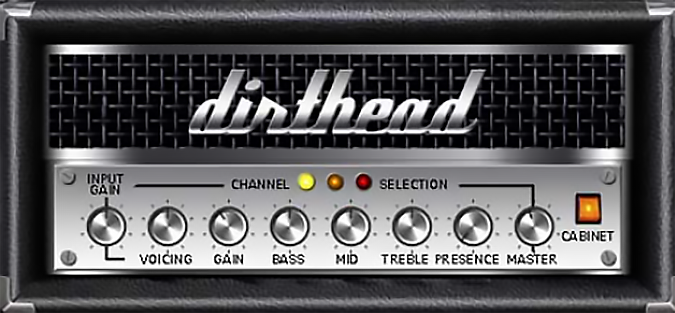
Dirthead
Key Features
- Three switchable amp channels (clean, crunch, ultra) activated via LED indicators for instant tone changes
- Voicing knob shifts internal power amp character from tight American response to loose British breakup
- Full set of guitar amp controls including gain, bass, mid, treble, presence, and master volume
- Ultra channel delivers thick high-gain distortion comparable to cranked Mesa-style amps
- Lightweight 0.28 MB footprint with minimal CPU usage for smooth DAW integration
- Works with third-party impulse response loaders to expand cabinet simulation options
- Tube-modeled signal path across all three channels for authentic analog warmth and response
Description
Dirthead is a virtual tube guitar amplifier by Ndzeit Audio that models a three-channel amp with clean, crunch, and ultra voicings. Each channel is activated by clicking the corresponding yellow, orange, or red LED on the interface, giving quick access to anything from warm cleans to saturated high-gain distortion.
Beyond standard amplifier controls like gain, bass, mid, treble, and volume, Dirthead includes a dedicated voicing knob that adjusts internal power amp parameters. This shifts the tonal character from tight American-style response to looser British-style breakup, similar to what Blackstar achieved with their ISF control on the HT series.
The ultra channel has drawn particular praise for its thick, aggressive tone. Users compare the red channel's output to the sound of a cranked Mesa Boogie Dual Rectifier captured with a Shure SM57 on a Celestion V30 cabinet, making it well-suited for heavy rhythm work and searing lead tones.
Dirthead excels at lo-fi and raw-sounding genres where authentic tube amp grit is more important than pristine modern modeling. It handles everything from raw blues overdrive to black metal distortion, delivering convincing results especially when paired with third-party impulse response loaders for cabinet simulation.
The plugin is a 32-bit VST for Windows, version 0.80. At just 0.28 MB, it loads instantly and consumes minimal CPU resources inside any VST-compatible host.
Video Preview


Frequently Asked Questions
How do I switch between the clean, crunch, and ultra channels?
Click the colored LED indicators on the plugin interface. Yellow activates the clean channel, orange selects crunch, and red engages the ultra high-gain channel.
What does the voicing knob do?
The voicing knob adjusts internal power amp parameters to shift the amp's tonal character. Turning it one direction gives a tight, focused American-style response, while the other direction produces a looser, more open British-style breakup. It works similarly to Blackstar's ISF control.
Does Dirthead include a cabinet simulation?
Dirthead models the amplifier head only and does not include a built-in cabinet simulator. For the best results, pair it with a third-party impulse response loader like NadIR or LeCab and load guitar cabinet IRs to complete the signal chain.
Is Dirthead available in 64-bit or for macOS?
Dirthead is only available as a 32-bit VST plugin for Windows. There is no 64-bit or macOS version. You can use a 32-bit bridge like jBridge to load it in 64-bit DAWs.


