
DJ Filter
Key Features
- Single-knob LP/HP sweep that mirrors a hardware DJ mixer filter for instant buildups and breakdowns
- Adjustable Q (resonance) control to dial in subtle warmth or aggressive filter peaks
- Wide parameter that broadens or narrows the filter curve for different tonal characters
- Artifact-free audio engine with no pops, clicks, or background noise during fast cutoff changes
- Compact 289 x 367 pixel interface designed for live performance and quick DAW automation
- Apple Silicon native support alongside Intel, AMD, and 64-bit Windows compatibility
- Lightweight 12.3 MB footprint with minimal CPU overhead compared to multi-mode filter plugins
Description
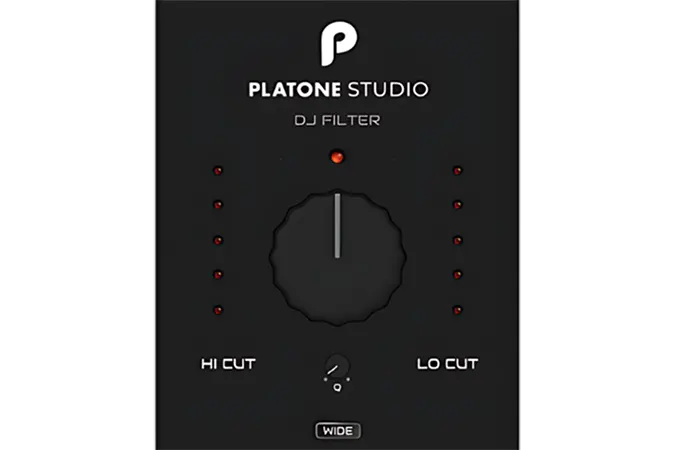
Platone DJ Filter is a streamlined filter effect built around a single large knob that sweeps between low-pass and high-pass modes. Turning the knob left applies a progressively deeper low-pass cutoff, while turning it right opens up a high-pass sweep, replicating the classic DJ mixer filter move inside any DAW.
Beyond the main cutoff control, the plugin provides adjustable Q (resonance) and Wide parameters. These let you shape the resonance peak and the width of the filter curve, adding edge or smoothness to each sweep depending on the material.
The interface is intentionally minimal, with the single oversized knob dominating a compact window. This makes it well suited for live performance rigs and quick automation, where reaching for one control is faster than navigating a complex filter panel.
Platone Studio designed the audio engine to avoid the pops, clicks, and background artifacts that can appear with abrupt cutoff changes. The transitions stay clean even during fast sweeps, so the plugin can sit on a master bus or individual channel without introducing unwanted noise.
DJ Filter supports VST, VST3, and AU formats on 64-bit systems, running on Windows 8.1 and above or macOS 10.9 and above with Intel or Apple Silicon processors. The download weighs in at 12.3 MB.
Video Preview

Frequently Asked Questions
What is the difference between the Q and Wide controls?
The Q control adjusts the resonance peak at the cutoff frequency, making the sweep more pronounced or subtle. The Wide parameter changes the width of the filter curve itself, letting you choose between a narrow surgical cut and a broader, more gradual roll-off.
Can DJ Filter be automated in a DAW for build-up effects?
Yes. The main filter knob, Q, and Wide parameters are all exposed for DAW automation. You can draw automation curves to create filter sweeps that sync with your arrangement, making it a practical alternative to manually riding the knob.
Does DJ Filter introduce latency or artifacts during fast sweeps?
Platone Studio specifically engineered the plugin to avoid pops, clicks, and background noise during rapid cutoff changes. The plugin introduces no additional latency, so it can be used on master buses or in live performance setups without audible artifacts.
Is DJ Filter suitable for use on a master bus?
Yes. The clean processing engine handles full-mix material without introducing noise or distortion. Many producers use single-knob filters like this on the master channel for DJ-style transitions between sections of a track or during live sets.


