dpMeter 5
Key Features
- Three measurement modes (RMS, EBU R128, DIAL) covering music production, broadcast, and dialog-gated post-production standards in one interface
- True peak detection based on ITU BS.1770-4 with inter-sample peak measurement across all metering modes
- Multi-channel metering supporting 2–6 RMS channels plus 2.0 stereo, 4.0, 4.1, and 5.1 surround configurations
- One-click gain matching that automatically adjusts the gain offset to hit your target reference loudness level
- K/A/B/C/M weighting filters for tailoring measurement curves to specific delivery requirements
- Metering values recordable as DAW automation data for retrospective loudness analysis over time
- GPU and non-GPU rendering versions available, with a freely resizable interface and preset management
Description
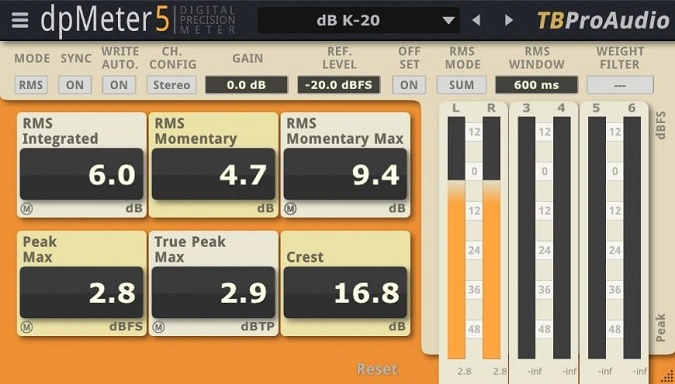
dpMeter 5 by TBProAudio is a precision multi-channel loudness meter built for professional audio measurement across stereo and surround configurations up to 5.1. It covers three distinct metering standards — RMS, EBU R128, and DIAL (dialog-gated) — with true peak detection based on ITU BS.1770-4, giving you broadcast-compliant readings in a single plugin.
The RMS mode provides integrated, momentary, peak, true peak, and crest measurements, while EBU R128 delivers integrated loudness, short-term, momentary, true peak, and loudness range values. DIAL mode adds dialog-gated measurement following the Dolby reference standard, making it particularly useful for film, television, and podcast post-production workflows.
Beyond raw metering, dpMeter 5 includes a gain-matching feature that automatically adjusts gain to hit your target reference level with a single click. This turns it into a practical gain staging tool, not just a passive readout.
You can also record metering values as DAW automation data, enabling retrospective loudness analysis across your session.
Weighting filters (K, A, B, C, and M) let you tailor the measurement curve to match specific delivery specs or personal preference. The resizable GUI keeps the meters readable at any screen size, and preset management saves your preferred configurations for instant recall.
TBProAudio provides both GPU-accelerated and CPU-rendered versions, so the plugin runs smoothly regardless of whether your system has a compatible graphics card. The current version (5.3.7) includes CLAP support alongside VST2, VST3, AU, and AAX.
Video Preview


Tips
- Use the RMS mode for integrated, momentary, peak, and true peak measurements to get a full view of your audio levels.
- Utilize the EBU R128 mode to make sure your audio meets broadcast standards.
- Apply the DIAL mode for dialog-gated measurements, especially useful for film and TV audio production.
- Take advantage of the GUI scaling feature to adjust the interface size according to your screen resolution.
- Use the preset management feature to save and recall your preferred settings quickly.
- Record metering results as automation data to analyze and adjust your audio levels over time.
- Adjust the pre-gain to match your reference level manually for consistent loudness across different tracks.
- Enable the loudness offset mode to display all RMS/EBU R128 values relative to a reference level.
Frequently Asked Questions
What is the difference between the GPU and non-GPU versions of dpMeter 5?
The GPU version uses OpenGL (Windows) or Metal (macOS) for hardware-accelerated graphics rendering, which provides smoother meter animation. The non-GPU version renders the interface entirely on the CPU. Both versions are functionally identical in terms of metering accuracy — choose the non-GPU version if your system lacks a compatible graphics card or if you experience display issues.
Can dpMeter 5 be used for Spotify and YouTube loudness targeting?
Yes. The EBU R128 mode measures integrated loudness in LUFS, which is the standard used by Spotify (-14 LUFS) and YouTube (-14 LUFS). Set your target reference level in the plugin, run your track, and use the gain match feature to see exactly how much adjustment is needed to hit the target.
What is DIAL mode used for?
DIAL (dialog-gated) mode measures loudness using Dolby's dialog gating reference standard. It calculates integrated loudness only during detected dialog passages, along with dialog proportion and loudness range. This is essential for film, television, and podcast content where dialog clarity and broadcast compliance are critical.
Does dpMeter 5 work with surround sound projects?
Yes. dpMeter 5 supports multi-channel metering for 2.0 stereo, 4.0, 4.1, and 5.1 surround configurations, plus 2–6 individual RMS channels. This makes it suitable for surround mixing in film, broadcast, and immersive audio production.