Dragonfly Hall Reverb
Key Features
- Realistic algorithmic hall reverb based on Freeverb3's Hibiki engine with Moorer early reflections and modified Zita late reverb
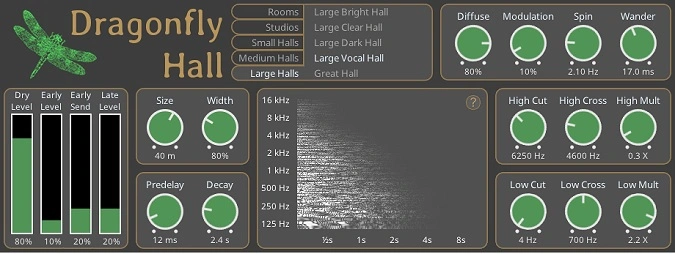
- Built-in real-time spectrogram that visualizes how parameter changes affect the reverb tail using FFT analysis
- Comprehensive preset library covering rooms, studios, chambers, small halls, medium halls, and large concert halls
- Color-coded knob system where orange knobs control tonality and dark blue knobs control levels for intuitive mixing
- Advanced Diffuse, Spin, and Wander dials for fine-tuning echo density, tail modulation, and spatial movement
- Independent high and low crossover multipliers enabling frequency-dependent decay shaping for natural roll-off
- Cross-platform and open-source with native support for Windows, macOS, and Linux in five plugin formats
Description
Dragonfly Hall Reverb is an open-source algorithmic reverb plugin by Michael Willis, built on the Hibiki Reverb engine from the Freeverb3 library. It uses Moorer's early reflection model paired with a modified FDN allpass Zita reverb to produce realistic concert hall simulations.
The plugin operates in stereo-to-stereo mode and ships with a wide selection of presets spanning rooms, studios, chambers, and halls of various sizes. Each preset is carefully tuned to replicate the acoustic characteristics of real spaces.
A built-in spectrogram visualizes how parameter adjustments shape the reverb output in real time, simulating a white noise burst through the current settings. Color-coded knobs indicate their function at a glance, with orange knobs affecting tonality and dark blue knobs controlling levels.
Advanced controls include a Diffuse dial for balancing echo density against coloration, a Spin dial that modulates the late reverb tail for a more organic sound, and independent high/low crossover multipliers for sculpting frequency-dependent decay. Users regularly compare it favorably to paid reverbs costing well over $100, praising its clarity, low CPU usage, and natural-sounding tails.
Available as VST2, VST3, CLAP, LV2, and AU on Windows, macOS, and Linux, the plugin requires OpenGL 3.0 for its graphical interface. The current version is 3.2.10, released under the GPL 3.0 license.
Video Preview


Tips
- Use the built-in spectrogram to see and fine-tune the reverb settings for a more precise sound.
- Try different hall presets to find the best match for your acoustic instruments or vocal tracks.
- Adjust the "wander" function to add a subtle modulation effect to the reverb tail, creating a more dynamic and evolving sound.
- Use the lowpass and highpass filters to shape the tonal characteristics of the reverb, ensuring it fits well within the mix.
- Combine Dragonfly Hall Reverb with other reverb types, such as room or plate reverbs, to create a layered and complex reverb effect.
- Save your custom settings as presets to quickly recall them in future projects.
Frequently Asked Questions
How does Dragonfly Hall Reverb compare to Valhalla VintageVerb?
Users in mixing communities frequently compare the two, noting that Dragonfly Hall delivers convincing hall simulations with clear, rich tails. Valhalla VintageVerb offers more tonal character and a wider range of vintage algorithms, but Dragonfly holds its own for natural-sounding spaces and is praised for sitting well in a mix.
What is the Spin parameter and how should it be used?
The Spin dial modulates the late reverberation tail by introducing subtle pitch and timing variations, similar to how air currents affect sound in a real hall. Increasing Spin adds a more organic, evolving quality to the reverb tail while keeping it free from obvious chorus artifacts.
Can Dragonfly Hall Reverb be used on individual tracks or only as a send effect?
It works well in both configurations. The independent Dry Level, Early Level, and Late Level sliders make it easy to use as an insert with precise wet/dry control. For mixing efficiency, many users run it on an auxiliary bus as a send effect, which is especially useful when multiple tracks need the same hall space.
Does the spectrogram affect CPU performance?
The spectrogram is rendered by simulating a burst of white noise through the algorithm only when settings change, not continuously during playback. It has negligible impact on CPU performance and can be left visible without concern during mixing sessions.