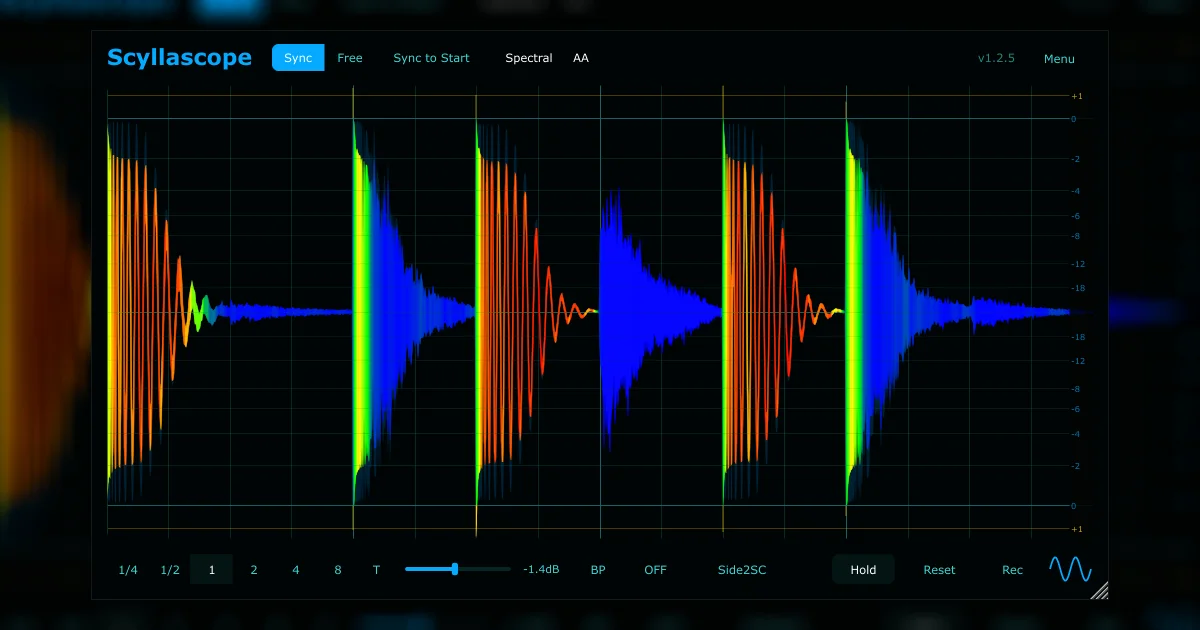
Scyllascope
Key Features
- Sync, Free, and Scroll oscilloscope modes for checking waveform timing, transients, and movement against the session grid.
- Inter-instance sidechain routing, signal overlay, and summing help compare layered tracks and diagnose phase or low-end conflicts.
- Spectral waveform, visual frequency filtering, and headroom display with clipping indication provide mix-focused visual feedback beyond a basic scope.
- Built-in recorder captures audio from the plugin, with normalize, trim, snap-to-grid, and drag-and-drop export back into the DAW.
- Scalable GUI with color themes, a separate theme editor, Hold mode, and advanced overrides.json configuration for deeper workflow customization.
- Recent 1.3.0 release adds signed and notarized macOS binaries, an update checker, smoother rendering, and multiple overlay and scroll-mode fixes.
- Reaper embedded integration lets the scope work more naturally inside Reaper-based analysis and editing setups.
Description
Scyllascope is a cross-platform oscilloscope plugin from DsgDnB built for waveform inspection, timing checks, phase comparison, and quick audio capture inside a DAW. It combines classic scope views with modern workflow tools, so producers can watch transients, low-end movement, clipping, and sidechain relationships without leaving the session.
The plugin centers on Sync, Free, and Scroll modes with smooth zooming, panning, spectral waveform display, headroom metering, and a scalable themed interface. Its inter-instance sidechain overlay and signal summing make it especially useful for checking kick and bass alignment, comparing layered drums, or seeing how multiple tracks interact over time.
Unlike a simple visual meter, Scyllascope includes a built-in recorder that can capture audio, normalize or trim it, snap it to the project grid, and drag the result straight back into the DAW. Recent updates add signed and notarized macOS builds, automatic update checking, Reaper embedded integration, color-theme tools, and fixes for smoother rendering at large divisions and high zoom levels.
The official DsgDnB page currently lists Scyllascope as a free oscilloscope plugin with downloads for Windows, macOS, and Linux in VST3, AU, and LV2 formats. The original lead covered multiple DsgDnB plugins, but Scyllascope is the strongest standalone product page because it has the clearest feature set, latest maintained release, and third-party catalog confirmation.
Video Preview

Frequently Asked Questions
What makes Scyllascope different from a basic oscilloscope?
Scyllascope adds inter-instance sidechain overlay, signal summing, spectral waveform display, low-end visual filtering, Hold comparison, and a built-in recorder. That makes it more useful for mix diagnosis than a simple single-track waveform viewer.
Can Scyllascope record audio from the plugin?
Yes. The official feature list says it can record audio and drag it straight into the DAW, with normalize, trim, and snap-to-grid tools for preparing the captured clip.
Is Scyllascope useful for kick and bass alignment?
Yes. The sidechain overlay, multi-instance visualization, visual frequency filtering, and sync modes are well suited to checking kick, bass, and other transient-heavy layers against each other.
Does Scyllascope have Reaper-specific features?
Yes. The official page lists Reaper embedded integration, and the 1.3.0 changelog includes several improvements around instance names, track colors, and sidechain overlay behavior.