
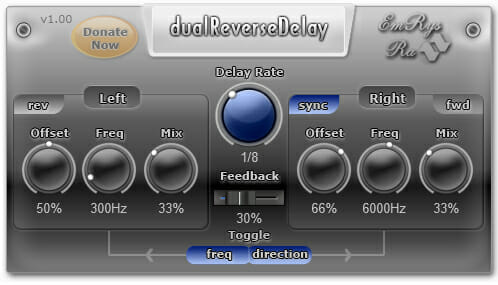
dualReverseDelay
Key Features
- Independent left/right channel controls with separate knobs for delay time, feedback, and direction per channel
- Per-channel reverse and forward delay toggle that creates unique cascading echo patterns between stereo sides
- Toggleable low-pass filter with left-to-right panning for shaping frequency balance across the stereo image
- Host-synced delay rates with standard, triplet, and dotted note divisions plus a free-time mode
- Offset-based stereo enhancement that doubles as a ping-pong delay when matching values are set on both channels
- Extremely lightweight at under 1 MB download size with minimal CPU overhead
Description
dualReverseDelay by SaschArt is a stereo delay plugin that plays audio in both forward and reverse directions independently per channel. Its dual-channel architecture gives you separate knob sets for left and right, letting you dial in different delay times, filter settings, and directions on each side for wide, evolving stereo textures.
The standout feature is the per-channel direction toggle, which lets one channel run in reverse while the other plays forward. When both channels swap directions on each repeat cycle, the result is a cascading interplay of reversed and normal echoes that sounds unlike any conventional delay.
A toggleable low-pass filter can be panned between left and right channels, letting you shape the frequency balance across the stereo field. This works especially well for taming brightness on one side while keeping the other open and airy.
Host-synced delay rates support standard, triplet, and dotted note values alongside a free-time mode for non-tempo-locked effects. Stereo width comes from adjustable left/right offset, which also creates ping-pong patterns when both sides share the same offset value.
The plugin supports VST (32-bit and 64-bit) on Windows and both VST and Audio Unit on macOS. The entire download is under 1 MB, and CPU usage is extremely low according to the developer.
Video Preview


Frequently Asked Questions
How do I get the cascading reverse-to-forward delay effect?
Set the same offset on both left and right channels, then set one channel to forward and the other to reverse. Activate the direction toggle so the channels alternate between reverse and forward on each delay cycle. This creates a cascading effect where a reversed echo on one side is immediately followed by a forward echo on the other.
Does the reverse delay start at a consistent point in the audio?
Some users on Plugins4Free have reported that the reverse delay start point can feel unpredictable at times. The effect works best when using host-synced rates so the delay timing stays locked to your project tempo, which helps keep the reverse tails more consistent.
What do the toggle buttons for frequency and direction actually do?
The toggle buttons swap the low-pass filter position (frequency toggle) or delay direction (direction toggle) between the left and right channels. They only produce a noticeable effect when the left and right settings are different from each other. If both channels share identical settings, toggling has no audible impact.
Can I use dualReverseDelay as a standard forward delay?
Yes. Set both channels to forward mode and the plugin functions as a conventional stereo delay with independent left/right timing, low-pass filtering, and host sync. The reverse capability is optional and can be engaged per channel whenever you want it.


