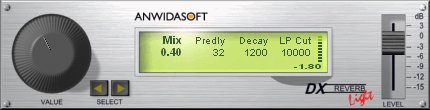
DX Reverb Light
Key Features
- Versatile single-algorithm reverb covering small rooms through large concert halls with adjustable attack and spread characteristics
- 64-bit internal precision and 24-bit/96kHz audio support for clean, artifact-free reverb tails across the full frequency spectrum
- Extremely low CPU usage thanks to heavily optimized DSP code, suitable for loading on multiple channels simultaneously
- True stereo reverb processing that preserves the original stereo imaging of the source material
- Streamlined controls for mix, pre-delay, decay, damping, and low-cut frequency for precise reverb shaping
- 23 factory presets ranging from tight vocal ambiences to expansive hall spaces for quick session setup
- Available in VST, AU, and DirectX formats with native 64-bit support on both Windows and macOS
Description
DX Reverb Light by ANWIDA Soft is an algorithmic reverb plugin that has earned a dedicated following since its original release in the early 2000s. It delivers convincing room and hall simulations through a single, highly versatile algorithm that covers everything from tight ambiences with the sharp coloration of small spaces to expansive concert-hall decays with natural-sounding spread and buildup.
Under the hood, the plugin runs at 64-bit internal precision with 24-bit/96kHz audio support, producing a clean and artifact-free reverb tail. Its DSP engine is heavily optimized, consuming remarkably little CPU even when loaded across multiple channels in a dense mix.
The interface keeps things streamlined with core controls for mix, pre-delay, decay time, and damping, plus a low-cut frequency knob for taming muddy low-end buildup. Twenty-three factory presets offer quick starting points ranging from intimate vocal rooms to cavernous ambient spaces.
True stereo processing preserves the original stereo image of your source material rather than collapsing or smearing it. Long-time users consistently praise the plugin for producing natural, musical reverb tails that sit well in a mix without harsh metallic artifacts.
Version 3.0 brought native 64-bit support for both Windows and macOS, along with AU format compatibility alongside the existing VST and DirectX formats. ANWIDA Soft has since released SPATIO Light as the official successor, but DX Reverb Light remains a proven workhorse that many producers keep in their template sessions.
Video Preview


Frequently Asked Questions
What is the difference between DX Reverb Light and the full DX Reverb?
DX Reverb Light includes one simplified algorithm from the eleven available in the full DX Reverb. It also lacks MIDI support for parameter automation and preset recall, which the full version provides through standard MIDI messages.
Is DX Reverb Light still being updated by ANWIDA Soft?
The last major update was version 3.0, which added 64-bit and AU support. ANWIDA Soft has since released SPATIO Light as the official successor with additional algorithms and a modernized interface, but DX Reverb Light remains available for download.
Does DX Reverb Light work well on high-resolution displays?
The plugin's GUI was designed for standard-resolution monitors and does not scale natively on high-DPI or Retina displays. Users on modern screens may find the interface appears small, though most DAWs offer plugin window scaling as a workaround.
Can DX Reverb Light handle long ambient and atmospheric reverb tails?
Yes. The decay parameter allows extended reverb times suitable for ambient and atmospheric production. Users report that the reverb tail remains clean and musical even at longer settings, making it effective for creating spacious pads and background textures.