
EasyQ
Key Features
- Unlimited filter bands in series connection, allowing as many EQ points as a mix demands
- Six filter types per band: bell, high shelf, low shelf, high-pass, low-pass (6 or 12 dB/oct), and notch
- Four stereo processing modes including linked, left/right, mid/side, and mono for precise stereo field control
- Plus or minus 48 dB gain range for both subtle tonal shaping and aggressive corrective cuts
- Minimum phase response design delivering clean, transparent equalization with no added coloration
- Extremely low CPU consumption enabling dozens of instances across a mixing session
- Also available inside RS-MET ToolChain with 64-bit Windows VST2 and macOS AU support
Description
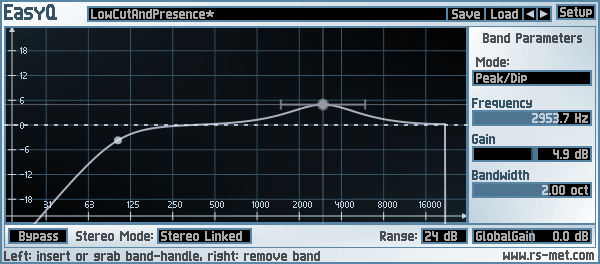
EasyQ by RS-MET is a lightweight parametric equalizer built around one core idea: add as many filter bands as you need, with no upper limit. Each band can operate as a bell (peak/cut), high shelf, low shelf, notch, or high/low-pass filter with either 6 or 12 dB per octave slopes, covering every standard EQ task in a single plugin.
The interface keeps things straightforward with a real-time frequency response display where you right-click to place bands and scroll to adjust bandwidth. Four stereo modes are available including linked, independent left/right, mid/side, and mono, making it flexible enough for detailed stereo shaping without needing a separate utility plugin.
With a gain range of plus or minus 48 dB and minimum phase response throughout, EasyQ handles everything from gentle tonal corrections to aggressive surgical cuts. CPU usage stays remarkably low even with many active bands, which is why users on KVR Audio forums consistently recommend it as their go-to EQ for mixing sessions where dozens of instances run simultaneously.
Robin Schmidt originally released EasyQ as a standalone Windows 32-bit VST plugin. The EQ engine has since been incorporated into RS-MET's ToolChain, a modular plugin shell supporting Windows VST2 64-bit and macOS AU formats, so the equalizer remains actively accessible on modern systems.
While EasyQ deliberately avoids analog modeling or spectral AI features, that transparency is exactly what makes it useful. It applies exactly the curve you draw with no hidden coloration, letting you focus on the mix rather than the tool.
Video Preview

Frequently Asked Questions
How many EQ bands can I use in EasyQ?
There is no upper limit on the number of bands. You can add as many filter stages as your project requires by right-clicking in the frequency display to place new nodes. Users regularly run 10 or more bands per instance without issues.
Does EasyQ support mid/side EQ processing?
Yes. EasyQ offers four stereo modes: linked (both channels together), independent left/right, mid/side, and mono. The mid/side mode lets you EQ the center and sides of a stereo signal independently, which is particularly useful for mastering and stereo bus processing.
Is EasyQ still available for 64-bit DAWs and macOS?
The standalone EasyQ plugin is a 32-bit Windows VST. However, its EQ engine is included in RS-MET's ToolChain plugin, which supports Windows VST2 64-bit and macOS AU formats. ToolChain is available from the same RS-MET freebies page.
Does EasyQ add any coloration or harmonic saturation to the signal?
No. EasyQ uses minimum phase filtering designed for transparent, clean equalization with no additional coloration. The developer explicitly describes it as performing no additional voodoo, making it ideal for clinical mixing tasks where accuracy matters more than character.


