easyReverb
Key Features
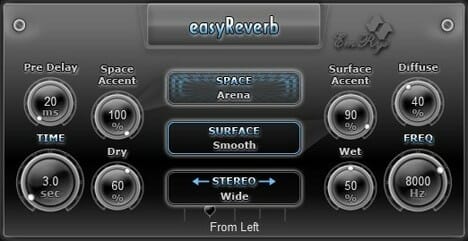
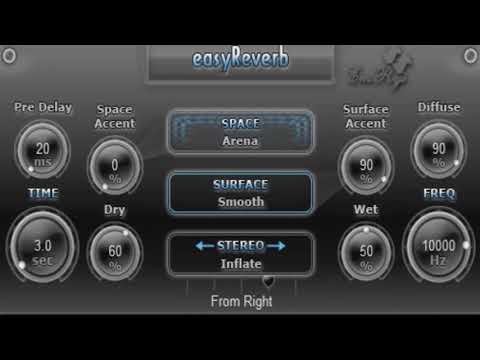
- Eight acoustic spaces including Arena, Cathedral, Hallway, Corridor, Chamber, Metallic Box, and two experimental modes (Special Fly, Special Explosion)
- Six surface algorithms (Smooth, Waves, Granulated, Rippled, Zigzag, Rich Zigzag) that simulate different wall textures and reflection patterns
- Accent controls for both space and surface that amplify or reduce the character of each setting from 0% to 100%
- Eight stereo reflection modes (Mono, Wide, Inflate, Squeeze, Cone, Reverse Cone, Steps, Reverse Steps) for creative spatial imaging
- Over 60 built-in presets ranging from tight ambiences to expansive experimental reverbs
- Extremely low CPU footprint under 500 KB binary size with less than 1% processor usage
- LP/HP filter selector (added in v1.6) along with predelay, diffusion, pan, and bypass ceiling controls
Description
easyReverb is an algorithmic reverb plugin by SaschArt that takes a unique approach to spatial processing. Instead of the usual hall/plate/room dropdown, it pairs eight acoustic spaces (Arena, Cathedral, Hallway, Corridor, Chamber, Metallic Box, Special Fly, and Special Explosion) with six surface algorithms that shape the texture of reflections.
The surface selector is the standout feature, offering Smooth, Waves, Granulated, Rippled, Zigzag, and Rich Zigzag modes that each model different wall characteristics. Combined with dedicated accent controls for both space and surface, you can dial in anything from a natural-sounding cathedral to metallic, experimental tails.
Eight stereo reflection algorithms expand the spatial palette beyond standard left-right imaging. Mono, Wide, Inflate, Squeeze, Cone, Reverse Cone, Steps, and Reverse Steps let you sculpt how the reverb fills the stereo field, making it easy to create movement and depth without extra processing.
The plugin ships with over 60 presets covering everything from tight ambiences to cavernous washes. Additional controls for predelay, diffusion, pan position, bypass ceiling, and a low-pass/high-pass filter (added in v1.6) round out the parameter set.
At under 500 KB with less than 1% CPU usage in typical sessions, easyReverb is one of the lightest reverb plugins available. It runs in 32-bit and 64-bit on both Windows and macOS, supporting VST, VST3, and AU formats.
Video Preview

Frequently Asked Questions
What makes easyReverb different from other reverb plugins?
easyReverb uses a surface selector system with six unique algorithms (Smooth, Waves, Granulated, Rippled, Zigzag, Rich Zigzag) that model the physical characteristics of wall surfaces. Combined with accent controls, this approach gives you more textural variety than a typical reverb's room-size knob.
Does easyReverb self-oscillate or produce noise when idle?
Some users have reported that easyReverb can self-oscillate when no audio is running through it. This is a known behavior with certain algorithmic reverbs and does not affect the sound quality during playback. Bypassing the plugin when not in use is a simple workaround.
What is the difference between easyReverb and SaschArt's sReverb?
easyReverb is the lightweight version designed for minimal CPU usage. sReverb is SaschArt's professional-grade reverb with additional algorithms and more detailed controls. Both share the surface selector concept, but sReverb targets users who need deeper parameter access.
How do the stereo reflection modes work?
The eight stereo modes reshape how reverb energy is distributed across the stereo field. Wide spreads reflections outward, Inflate and Squeeze adjust perceived width, Cone and Reverse Cone create directional patterns, and Steps and Reverse Steps introduce stepped spatial movement. Each mode uses a different algorithm.