Eclipsis
Key Features
- Three wavetable oscillators drawing from 118 base waveforms expandable to 1,888 variations through three built-in shaping tools
- Independent filter per oscillator with 17 selectable filter modes for detailed tonal sculpting across each voice layer
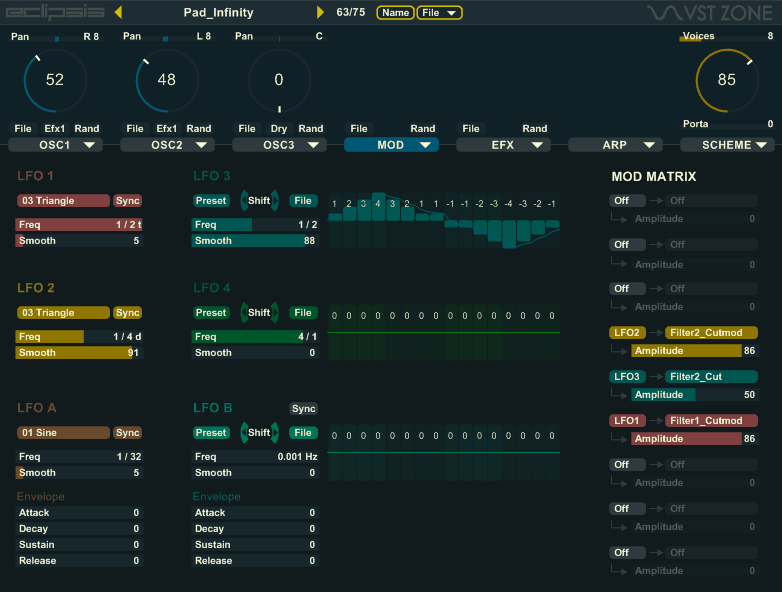
- Modulation matrix with 6 assignable LFOs, 9 sources, and 39 targets for deep sound animation and movement
- Arp/Gate dynamics module that routes rhythmic patterns to up to 7 parameters simultaneously for evolving textures
- Two effects racks each containing reverb, chorus, and delay for layered in-plugin processing
- Preset randomization engine with subpreset saving and loading per section for rapid experimental sound design
- 32-voice polyphony supporting everything from thick unison leads to wide ambient pads
Description
Eclipsis by VST Zone is a hybrid wavetable synthesizer that combines wavetable oscillators with subtractive synthesis in a feature-dense package. Three independent oscillators each draw from a library of 118 base waveforms that can be modified with three shaping tools, expanding the total palette to 1,888 waveform variations.
Each oscillator has its own independent filter with 17 available modes, giving you granular control over the tonal character of each voice layer. The synth supports up to 32 voices of polyphony, making it capable of handling everything from thick unison leads to wide stereo pads.
Six freely assignable LFOs feed into a modulation matrix with 9 sources and 39 targets, providing deep movement and animation across the entire engine. The Arp/Gate dynamics module goes beyond basic arpeggiation by routing rhythmic patterns to up to 7 different parameters simultaneously.
Two separate effects racks each contain reverb, chorus, and delay, letting you build complex multi-layered processing chains within the plugin. A unique preset randomization system combined with subpreset saving and loading for individual sections makes experimental sound design fast and rewarding.
Eclipsis runs as a 32-bit VST 2.4 plugin on Windows only, built with FlowStone. The DLL and its subpreset folders must be extracted together into the same VST directory for the plugin to locate its preset data correctly.
Video Preview


Frequently Asked Questions
Why does Eclipsis not load its presets after installation?
Eclipsis requires its subpreset folders to be in the same directory as the eclipsis.dll file. When extracting the download, make sure to preserve the folder structure and place everything together in your VST plugin directory. The plugin automatically looks for its data folders relative to the DLL location.
How does the subpreset system work?
Eclipsis lets you save and load presets for individual sections of the synth rather than only full patches. This means you can mix and match oscillator settings, filter configurations, and modulation routings from different presets, making it much faster to build new sounds from existing components.
Can Eclipsis run in a 64-bit DAW?
Eclipsis is a 32-bit VST 2.4 plugin built with FlowStone. Most modern 64-bit DAWs on Windows can bridge 32-bit plugins natively or through a third-party wrapper like jBridge. Performance may vary depending on your DAW and system configuration.
What types of sounds can Eclipsis produce?
Users report that Eclipsis excels at ambient textures, FX sounds, acoustic-like timbres, lush pads, and thick bass lines. The combination of 1,888 waveform variations, deep modulation routing, and dual effects racks gives it a wider sonic range than most synthesizers in its class.