
epicCLOUDS
Key Features
- True stereo reverb design that preserves signal clarity and prevents source masking across all settings
- Bloom envelope shaper module that controls the reverb attack character from sharp transients to smooth cloud-like builds
- Decay times adjustable from 1,000 ms to 60,000 ms for everything from subtle ambience to massive sixty-second reverb tails
- Built-in spectrum-based audio visualizer for monitoring the stereo image and frequency distribution in real time
- Mod and Tone controls for adding modulation movement and shaping the reverb frequency response
- Switchable High Quality and Economy modes for managing CPU usage in demanding sessions
- Pre-delay option for adding depth and separation between the dry signal and reverb onset
Description
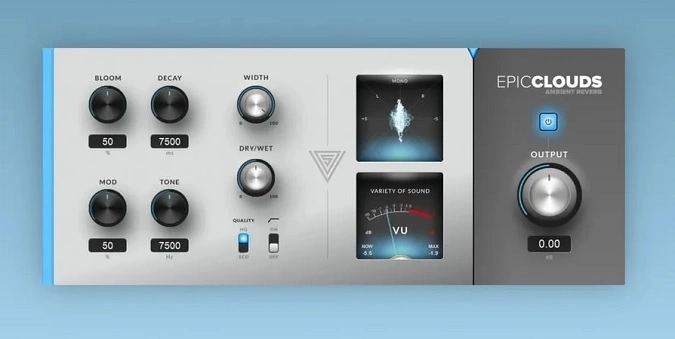
epicCLOUDS by Variety of Sound is an ambient reverb plugin engineered to replicate the reverberation of large, open environments like concert halls, cathedrals, and outdoor settings. It generates lush, expansive reverb textures with exceptionally high internal density from the very first reflection.
The plugin maintains remarkable signal clarity across all settings thanks to its end-to-end true stereo design. This architecture prevents common issues like source signal masking while delivering a convincing sense of envelopment around the original audio.
At its core, epicCLOUDS features a Bloom module that acts as a time-warping envelope shaper, controlling how the reverb attack unfolds. The Decay parameter offers adjustable tail length from 1,000 ms up to 60,000 ms, covering everything from moderate ambient washes to massive sixty-second reverb clouds.
Musicians and producers have praised its sound quality, with many noting it sits in a mix without nasty resonances or artifacts. The clean interface with just a handful of controls makes it easy to dial in exactly the right reverb for any situation.
Additional controls include Mod for adding movement, Tone for frequency shaping, a quality switch toggling between High Quality and Economy modes, and a built-in spectrum analyzer for real-time stereo image visualization.
Video Preview


Tips
- Use the Bloom parameter to control the smoothness or sharpness of the reverb attack.
- Adjust the Decay parameter to set the desired length of the reverb tail, from short room simulations to long ambient effects.
- Utilize the Mod and Tone parameters to add movement and shape the frequency response of the reverb.
- Switch to Economy mode if you need to save CPU resources during complex projects.
- Employ the spectrum-based audio visualizer to fine-tune the reverb settings and ensure a balanced stereo image.
- Experiment with the pre-delay switch to create a sense of depth and space in your mix.
Frequently Asked Questions
How does epicCLOUDS compare to Valhalla Supermassive?
Both plugins excel at ambient reverb, but they take different approaches. epicCLOUDS focuses on one particular lush reverb sound with a simple interface, while Supermassive offers nearly limitless combinations of ambient reverb and delay at the cost of being harder to tame.
What does the Bloom parameter actually do?
Bloom acts as a time-warping envelope shaper that controls how the reverb builds up after the initial transient. Turning it up creates a slower, more gradual reverb swell, while lower settings let the reverb respond more immediately to the source signal.
Can epicCLOUDS handle shorter reverb settings or is it only for long ambient tails?
While it specializes in ambient textures, epicCLOUDS can produce shorter reverbs without sounding metallic or tinny. The Decay parameter goes as low as 1,000 ms, and users have reported success with subtle, shorter settings that still retain the plugin's characteristic smoothness.
Does epicCLOUDS have issues with offline rendering or bouncing?
Some users have reported that offline rendering can produce different results compared to real-time playback. If you encounter inconsistencies when bouncing, try using real-time export instead of offline rendering in your DAW.


