
EQ302
Key Features
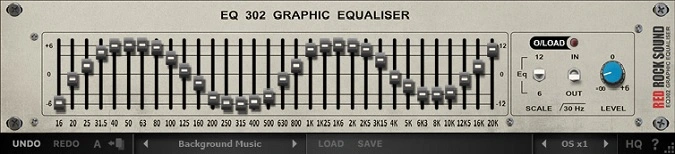
- 32 bands of 1/3 octave equalization spanning 16 Hz to 20 kHz with 12 dB of cut or boost per band
- High-precision slider control down to 1/1000th of a dB for surgical frequency adjustments
- Switchable 30 Hz low-cut filter to eliminate sub-bass rumble and clean up the low end
- Overload LED indicator and overall level knob for safe gain staging after EQ changes
- Center frequencies matched to the Red Rock Sound SA60 Spectrum Analyzer for seamless analysis-to-EQ workflow
- Modeled after classic rack-mounted analog graphic EQs with minimal phase distortion and noise
- Full Apple Silicon (M1+) native support alongside Intel and AMD processors
Description
EQ302 by Red Rock Sound is a 32-band graphic equalizer modeled after classic rack-mounted analog units. It delivers precise tonal control with 12 dB of cut or boost across 1/3 octave steps spanning 16 Hz to 20 kHz.
Red Rock Sound built the EQ302 to meet high filter calibration and reliability standards, avoiding the phase distortion, noise, and frequency anomalies that plague cheaper graphic EQ designs. The result is a crystal-clear output signal that preserves your mix integrity.
The plugin includes a switchable 30 Hz low-cut filter to tame unwanted sub-bass rumble, an overall level knob for gain staging after EQ adjustments, and an overload LED to monitor clipping. Its center frequencies align with Red Rock Sound's SA60 Spectrum Analyzer, so readings transfer directly between the two.
Users praise the EQ302 for its fine-grained precision, with slider adjustments possible down to 1/100th or even 1/1000th of a dB. This makes it well-suited for both corrective room compensation and subtle tonal shaping on the mix bus or individual tracks.
EQ302 supports VST, VST3, AU, and AAX formats on macOS 10.14.6+ (with full Apple Silicon support) and Windows 7+. It requires an internet connection for initial activation only.
Video Preview
Tips
- Use the 32 bands to fine-tune specific frequencies in your mix, ensuring each element of your track sits well together.
- Apply the low cut filter at 30 Hz to remove unnecessary sub-bass frequencies that can muddy your mix.
- Utilize the overload LED indicator to monitor and prevent clipping in your signal.
- Experiment with boosting and cutting different frequency bands to shape the tonal balance of your tracks creatively.
- Pair the EQ302 with a spectrum analyzer, like the SA60, to visually monitor frequency adjustments and ensure precise control.
- Use the overall level knob to adjust the output level after making EQ changes, maintaining a balanced mix.
- For live sound applications, use the EQ302 to compensate for room acoustics and improve overall sound quality.
- In studio settings, use the EQ302 to address specific frequency issues in individual tracks or the overall mix.
Frequently Asked Questions
Does EQ302 work as a companion to the SA60 Spectrum Analyzer?
Yes, the EQ302's center frequencies are specifically matched to the SA60's frequency bands. This lets you read the SA60's 1/3 octave analysis and transfer adjustments directly to the corresponding EQ302 bands without any frequency mapping guesswork.
Can EQ302 handle subtle mastering-level adjustments?
The slider precision goes down to 1/1000th of a dB, making it capable of extremely fine adjustments. Users report using it on the mix bus and for mastering tasks where broad tonal shaping with minimal artifacts is needed.
Does EQ302 require an internet connection to use?
Only for the initial plugin activation. Once the plugin is successfully activated, you can go offline and use it without any further internet connection.
What is the input routing and groups feature in EQ302?
The groups module lets you select from four available equalizers arranged in series. This allows you to process channels with different EQ settings simultaneously, giving you more flexibility than a single 32-band pass.


