
Free Clip
Key Features
- Six clipping algorithms from transparent hard clip to warm arctangent saturation, each producing a different harmonic character
- Adjustable oversampling from 2x to 32x to eliminate high-frequency aliasing artifacts during aggressive clipping
- Ceiling slider with matched level meter for precise visual threshold control
- Independent input and output gain controls for driving saturation or matching levels after clipping
- Dual-purpose design works as both a mastering-grade peak clipper and a creative saturation effect
- Extremely low CPU usage and near-instant loading time even at moderate oversampling settings
- Successor Free Clip 2 available in Free Suite with resizable GUI, VST3/AU/AAX formats, and Linux support
Description
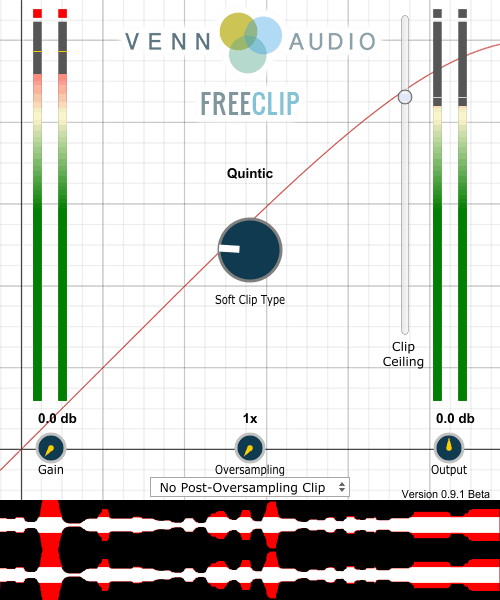
Free Clip by Venn Audio is a multi-algorithm soft clipper and wave shaper designed to transparently boost loudness by trimming signal peaks. It offers six distinct clipping curves ranging from a pristine hard clip to the richly saturated arctangent shape, giving you precise control over how aggressively the signal is shaped.
The plugin features an intuitive ceiling slider paired with a matching level meter, so you can visually dial in the exact threshold where clipping begins. Oversampling up to 32x is available to suppress high-frequency aliasing, and dedicated input and output gain controls let you push the signal harder or tame the result.
For mastering work, the hard clip, quintic, or cubic curves deliver near-transparent peak reduction with minimal harmonic coloration. Users consistently praise this mode for rivaling paid clippers in sheer transparency when the ceiling is set just below 0 dB.
Beyond transparent clipping, Free Clip doubles as a saturation and distortion tool. Switching to softer curves like algebraic or arctangent and lowering the ceiling drives the signal into musical harmonic saturation, effective on drums, bass guitars, and even full mixes when used carefully.
Free Clip has been succeeded by Free Clip 2, part of Venn Audio's Free Suite, which adds a resizable interface and VST3, AU, and AAX support across Windows, macOS (including Apple Silicon), and Linux.
Video Preview

Frequently Asked Questions
What clipping shapes are available in Free Clip?
Free Clip provides six sigmoid functions: Hard, Quintic, Cubic, Hyperbolic Tangent, Algebraic, and Arctangent. Hard clip is the most transparent but sharpest, while arctangent is the softest and most saturated. For mastering, the hard, quintic, or cubic shapes are recommended because they introduce minimal harmonic distortion below the ceiling.
Does oversampling affect CPU usage significantly?
At lower oversampling values the plugin is extremely light on CPU. Higher settings like 16x or 32x can become noticeably heavier, so these are best reserved for offline rendering or final bounces rather than real-time tracking sessions.
What is the difference between Free Clip and Free Clip 2?
Free Clip 2 is the successor included in Venn Audio's Free Suite. It adds a zoomable and resizable interface, VST3 and AAX format support, and native Apple Silicon and Linux compatibility. The original Free Clip is maintained only for opening legacy projects.
Can Free Clip be used as a saturation or distortion plugin?
Yes. By selecting a softer curve like algebraic or arctangent and lowering the ceiling level, you drive the signal into harmonic saturation. Increasing the input gain into the clipper achieves the same effect. Raising the oversampling value helps reduce aliasing when using the plugin this way.


