
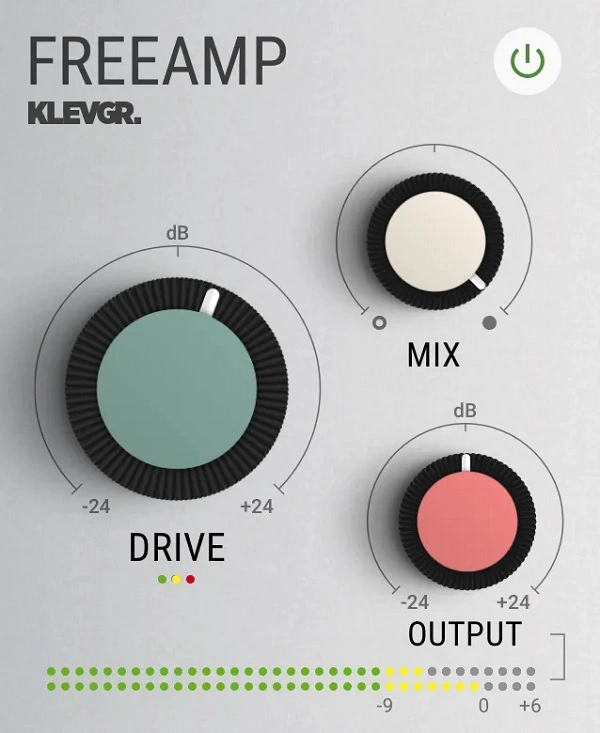
FreeAMP
Key Features
- Combined tape and tube saturation algorithms derived from the full REAMP plugin, delivering a unique handcrafted profile that is not a blueprint copy of any existing hardware
- Automatic gain compensation on the Drive control keeps perceived loudness steady as saturation increases, preventing level jumps during A/B comparisons
- Built-in dry/wet Mix knob for instant parallel processing without additional DAW routing or auxiliary sends
- Ultra-low latency operation suitable for real-time tracking and live performance alongside mixing duties
- Minimal CPU footprint allows stacking multiple instances across an entire mix session without performance concerns
- Streamlined three-knob interface (Drive, Mix, Output) designed for fast, intuitive workflow with no menu diving
- Compatible with VST, AU, and AAX hosts on both macOS (including Apple Silicon optimization) and Windows
Description
FreeAMP by Klevgrand is a stripped-down edition of their REAMP audio gear modeling plugin, delivering a curated blend of tape and tube saturation through a single universal profile. Rather than offering individual hardware emulations, Klevgrand combined their favorite saturation algorithms from REAMP into one cohesive character that works across vocals, guitars, drums, and full mixes.
The interface keeps things deliberately simple with just three controls: Drive, Mix, and Output. The Drive knob pushes the signal through the saturation engine with automatic gain compensation, so the perceived volume stays consistent as you dial in more harmonic content.
The Mix control enables parallel processing directly within the plugin, letting you blend dry and saturated signals without complex routing in your DAW. This makes it especially effective for adding subtle warmth to a bus or stem without overwhelming the original dynamics.
The saturation character leans toward a warm, musical tone rather than harsh digital clipping. Users consistently praise the transparent, slightly "Fenderish" quality that works well at low drive settings for gentle coloration, while stacking multiple instances can push the sound into more aggressive overdrive territory.
FreeAMP runs with ultra-low latency and minimal CPU overhead, making it practical to use on every channel in a mix session. Version 1.0.4 refined the algorithm by removing an earlier stereo width artifact and taming excess high-frequency harmonics, resulting in a tighter and more predictable saturation response.
Video Preview


Tips
- Use the Drive control to add subtle warmth or aggressive distortion to your tracks.
- Experiment with the Mix knob for parallel processing, especially on drums and percussive elements.
- Apply FreeAMP on vocals to add a vintage character and presence.
- Use the Output control to ensure the final volume is balanced after applying saturation.
- Try stacking multiple instances of FreeAMP for a more intense saturation effect.
- Combine FreeAMP with other effects like reverb and delay for a richer sound texture.
- Use FreeAMP on the master bus to add analog warmth to the entire mix.
Frequently Asked Questions
How does FreeAMP compare to the full REAMP plugin?
FreeAMP uses the same core algorithms as REAMP but combines Klevgrand's favorite saturation profiles into a single fixed character. The full REAMP plugin lets you select and customize different hardware emulation profiles independently, while FreeAMP offers one blended tape-and-tube profile with a streamlined three-knob interface.
Does FreeAMP require an account to download?
Yes, you need to create a free Klevgrand user account at klevgrand.com before downloading. After completing the checkout process at $0, you receive a download link and personal license key to activate the plugin on first launch.
Can you stack multiple instances of FreeAMP for heavier saturation?
Yes, stacking two or more instances is a popular technique among users. Running multiple instances in series pushes the saturation harder, which can produce anything from warm vintage overdrive tones to more aggressive distortion depending on your drive settings.
What changed in the version 1.0.4 update?
Version 1.0.4 addressed user feedback by removing an exaggerated stereo widening effect and taming excess high-frequency harmonic content that some users found harsh. The result is a tighter, more focused saturation character with a more predictable stereo image.


