
Gainer


Key Features
- Large central gain knob with a wide range from +24 dB boost to -100 dB cut for precise level matching between plugins
- Real-time input and output metering that shows signal levels entering and leaving the plugin at a glance
- Built-in inverted gating compressor with threshold, attack, and release controls for subtle noise reduction
- One-click phase inversion toggle for correcting polarity issues when layering multi-miked sources
- Apple Silicon native support on macOS alongside Intel compatibility and Windows 64-bit
- Lightweight single-file installer that covers both macOS and Windows in one download
Description
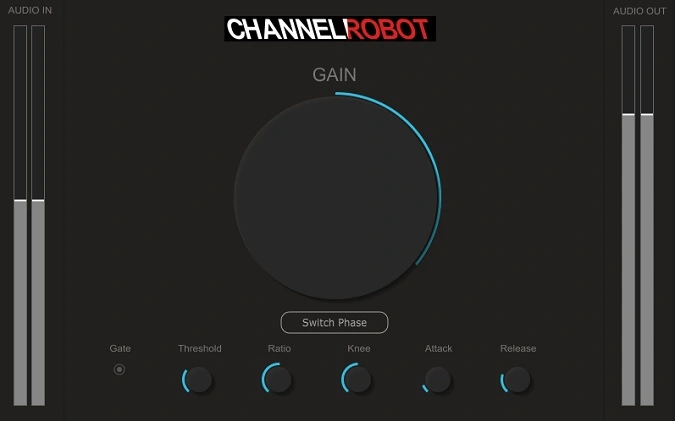
Gainer by Channel Robot is a straightforward gain staging utility designed to give you precise level control between every plugin in your effects chain. It displays both the incoming signal level (Audio In) and the outgoing level (Audio Out), letting you monitor and adjust gain at each point in the chain with a single large knob that ranges from +24 dB to -100 dB.
Proper gain staging ensures every plugin in your chain receives an optimal signal level, which directly impacts sound quality and dynamic behavior. Without it, processors downstream can clip, distort, or underperform because they are being fed a signal that is too hot or too quiet.
Beyond simple level adjustment, Gainer includes an inverted gating compressor for taming unwanted noise in the signal path. You set the threshold, attack, and release controls, and it responds smoothly to line noise from raw vocal and DI guitar tracks alike.
A dedicated phase inversion toggle rounds out the feature set, making it quick to correct phase issues when layering multi-miked sources such as drum kits. The interface is clean and minimal, with clearly labeled input and output meters flanking the central gain knob.
Gainer runs as a VST3 and AU plugin on macOS (Intel and Apple Silicon) and Windows, with a single installer file covering all platforms. It was originally priced at $29.95 but has been made permanently available at no cost.
Video Preview


Tips
- Use the gain adjustment knob to keep each plugin in your chain at the right input level.
- Utilize the inverted gating compressor to cut down on unwanted noise in your signal path.
- Toggle the phase inversion button to fix phase issues, especially when mixing drums.
- Monitor the input and output gain levels in real-time to keep audio levels consistent throughout your effect chain.
- Experiment with different gain settings to find the best spot for each plugin in your mix.
Frequently Asked Questions
Why would I use Gainer instead of my DAW's built-in volume fader?
A DAW fader controls the channel level going to the mix bus, but it does not adjust the signal between individual plugins in the insert chain. Gainer sits between plugins so you can ensure each processor receives the optimal input level, which directly affects how compressors, saturators, and EQs respond.
How does the inverted gating compressor differ from a standard noise gate?
A standard noise gate simply mutes the signal below a threshold, which can sound abrupt. Gainer's inverted gating compressor uses threshold, attack, and release controls to reduce noise more gradually, producing a smoother and more controllable result on sources like raw vocals and DI guitar tracks.
Can Gainer be used on the master bus or is it only for individual insert chains?
Gainer works anywhere in your signal path. You can place it on individual channel inserts to manage levels between effects, on a bus to trim group levels, or even on the master bus to set a final output ceiling before a limiter.
Does the phase inversion button introduce any latency?
No. Phase inversion is a simple polarity flip that multiplies the signal by -1, so it adds zero latency and zero CPU overhead. It is useful for fixing comb filtering when blending close-miked and overhead drum recordings.


