
Key Features
- Shape peaks with an adjustable hard-to-soft clipping knee
- Set input gain and clipping level independently
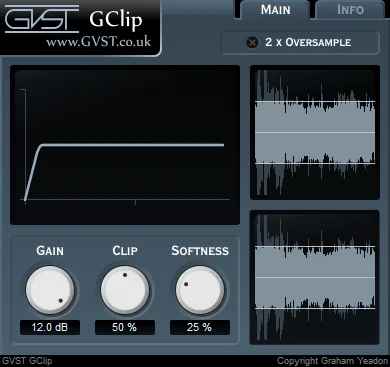
- View the transfer curve as controls change
- Compare input and output in the waveform display
- Enable 2x oversampling to help reduce aliasing
- Create subtle peak control or more pronounced distortion
Description
GClip by GVST is a wave-shaping clipper for controlling peaks or adding distortion to audio. Its adjustable knee moves from hard clipping to a smoother curve, making it useful for shaping drums, vocals, or other tracks in a VST host.
The Gain control raises the signal before it reaches the clipper, while Clip sets the maximum sample level. Increasing the input or lowering the clip level pushes more of the waveform into the clipping stage, so the result depends on both settings.
Softness changes how the signal approaches the ceiling. At zero, samples beyond the threshold are truncated; higher settings also affect samples approaching it, allowing a more gradual transition.
A graph shows the clipping curve, and a separate waveform display overlays the processed signal on the input after gain. The threshold line provides a visual reference while setting the controls, though GVST also recommends listening closely to passages that reach it.
A switch enables 2x oversampling to help reduce aliasing introduced by wave shaping, particularly at aggressive settings. For a deliberate distortion effect, the developer suggests combining excessive gain with harder clipping.
Plugins4Free lists Windows, macOS and Linux VST versions, and users there have praised the visual feedback for peak shaping. Check GVST's download options for the build that fits your operating system and host.
Frequently Asked Questions
What does the Softness control do?
Softness adjusts the knee of the clipping curve. At zero, samples over the threshold are truncated; higher values also affect samples approaching the threshold.
What does the waveform display show?
It shows the signal after input gain with the clipped output overlaid. A horizontal line indicates the clipping level.
Why use 2x oversampling?
Wave shaping can introduce aliasing, especially with drastic settings. The optional 2x mode can help reduce it.
Which systems can run GClip?
Plugins4Free lists Windows, macOS and Linux VST versions. Check GVST’s download options for a build compatible with your host and operating system.


