
GnomeDistort

Key Features
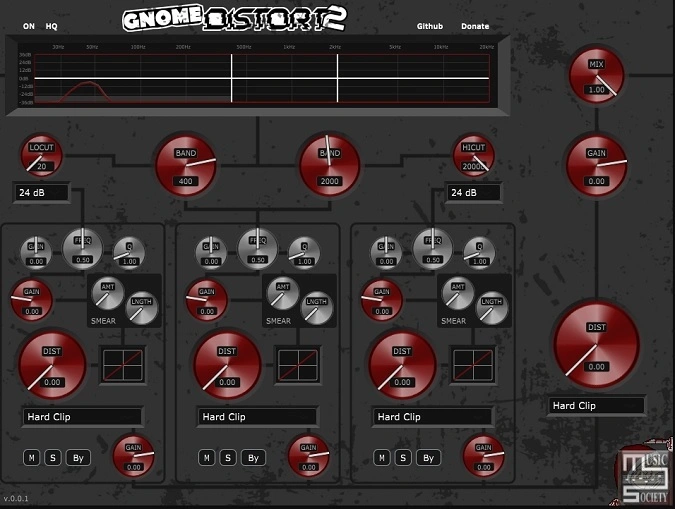
- Three configurable frequency bands (20-999Hz, 20Hz-20kHz, 1-20kHz) with independent distortion processing per band
- Unique SMEAR function on each band for unpredictable harmonic generation and signal mangling
- Multiple waveshaper algorithms per band ranging from moderate distortion to extreme destruction
- Global low-cut and high-cut filters with variable slopes for pre-distortion signal shaping
- Global post-stage waveshaper for additional distortion after band summing
- Per-band peak filters with high gain ranges for surgical frequency emphasis before distortion
- Nine built-in visual themes including dark, basalt, oscilloscope, and clean color variants
Description
GnomeDistort 2 by Crowbait is a multiband distortion plugin built for extreme sound destruction. It splits your signal into three configurable frequency bands, each with its own peak filter, high-range input gain, waveshaper, and the unique SMEAR function that pushes signals into unpredictable territory.
The plugin deliberately avoids subtle saturation territory. Its waveshaper algorithms range from "somewhat tame-ish" to "brutally destructive," producing harmonics and distortion textures that conventional distortion plugins simply cannot replicate.
Global low-cut and high-cut filters with variable slopes let you shape the signal before it hits the distortion stages. A global post-stage waveshaper adds a final layer of destruction after the three bands are summed, giving you control over the overall character of the output.
The plugin excels on individual instruments in aggressive genres, particularly on guitars, acid synths, and Reese basses where the peak filters can push through additional harmonics. Output gain sliders on each band are essential since the extreme gain values produce significant clipping by design.
Built with the JUCE framework and released under a GPL-3.0 open-source license, GnomeDistort 2 includes nine visual themes accessible by clicking the gnome icon. Pre-built VST3 binaries are available for Windows (tested on Win11), with macOS and Linux builds also provided.
Video Preview


Tips
- Use the output gain sliders to manage extreme gain values and clipping.
- Consider using a noise gate in front of GnomeDistort to handle the extreme gains and clipping.
- Experiment with the low cut and peak filters to shape your sound.
- Try different waveshaper options to find the right level of distortion for your track.
- Use GnomeDistort on single instruments in aggressive music genres for best results.
- Explore the different themes available to customize the interface to your liking.
Frequently Asked Questions
What is the SMEAR function in GnomeDistort?
SMEAR is a unique per-band control that pushes your signal into unpredictable harmonic territory. The developer created it experimentally rather than from traditional DSP literature, so it produces unconventional results you won't find in other distortion plugins. The best way to understand it is to try it at different settings on various source material.
Why is there so much clipping and noise when using GnomeDistort?
GnomeDistort is intentionally designed for extreme gain values and destructive distortion. The output gain sliders on each band are essential for managing levels since the plugin produces significant clipping by design. The developer recommends placing a noise gate before GnomeDistort to handle the noise floor that comes with these extreme gain settings.
Can I build an AU version of GnomeDistort for my DAW?
Yes. While pre-built releases only include VST3 files, GnomeDistort 2 is open source and can be compiled with AU support using the included JUCE Projucer. Open the .jucer file in Projucer, navigate to Plugin Formats in settings, enable AU, and build the project. You will need Xcode on macOS to compile.
Is GnomeDistort suitable for mix bus saturation or mastering?
No. The developer explicitly states this plugin is not meant for soft saturation. It is designed for destructive distortion on individual instruments in aggressive genres like metal, industrial, and hard electronic music. For subtle saturation or mix bus warmth, a different plugin would be more appropriate.


