
GVST GGate
Key Features
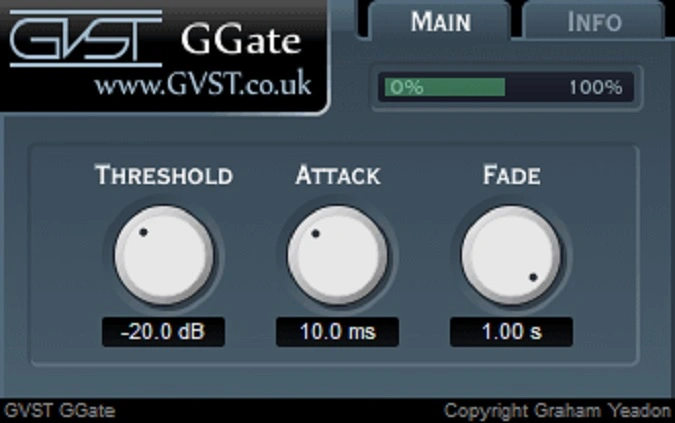
- Threshold control sets the exact dB level below which the incoming signal is silenced
- Adjustable fade time controls how quickly the gate closes after the signal drops, from instant cuts to gradual fades
- Variable attack speed determines how fast audio unmutes, supporting both percussive emphasis and natural ramp-up
- Real-time visual meter displays gate activity level for precise threshold calibration
- Single-file installation with no installer needed, keeping setup as simple as copying one file
- Cross-platform support for Windows, macOS, and Linux with both 32-bit and 64-bit builds
Description
GGate by GVST is a straightforward noise gate plugin built for one job: silencing audio that falls below a set threshold. It strips away amplifier hum, effect chain artifacts, and other background noise during quiet passages, letting the main signal pass through cleanly when it exceeds the threshold level.
The plugin runs on just three controls. Thresh sets the dB level below which audio is muted, Fade determines how quickly the gate closes once the signal drops, and Attack controls how fast the signal unmutes when it rises back above the threshold.
A real-time activity meter provides visual feedback on the gate's behavior, making it easy to dial in precise threshold settings without guesswork. Fast attack times can emphasize percussive techniques like palm muting on high-gain guitar, while slower settings produce a more natural ramp-up.
GGate has earned a reputation in audio production communities for doing exactly what a basic gate should do without unnecessary complexity or CPU overhead. The plugin is a single file with no installer required, keeping it as lightweight as possible.
Available for Windows, macOS, and Linux in VST format, with both 32-bit and 64-bit versions included for Windows and Linux. Each download is a single DLL, VST, or SO file that you simply copy into your plugin folder.
Video Preview


Tips
- Use the gate to control background noise on tracks, allowing for a cleaner mix.
- On high-gain guitar parts, use GGate to emphasize staccato-like passages and palm-muting techniques.
- Adjust the fade control to avoid noticeable quick fades, unless a specific effect is desired.
- Monitor the visual feedback meter to fine-tune the threshold setting.
- Experiment with different attack times to achieve the desired sound for various instruments.
- Combine GGate with other effects to enhance its noise reduction capabilities.
Frequently Asked Questions
What controls does GGate have?
GGate has three controls: Threshold (the dB level below which audio is silenced), Fade (how long it takes the gate to close after the signal drops), and Attack (how quickly the signal unmutes when it rises above the threshold). A visual meter also shows the gate's activity in real time.
Can GGate be used as a creative effect?
Yes. On high-gain guitar parts, fast attack and fade settings can emphasize staccato passages and palm-muting techniques, turning the gate into a rhythmic shaping tool rather than just a noise reduction utility.
Does GGate completely remove background noise?
GGate silences audio below the threshold, but when the gate opens to let the main signal through, any background noise present at that level also passes. The noise becomes less noticeable because the louder program material dominates, but it is not filtered out of the signal itself.
What is the best free noise gate VST plugin?
GGate is widely recommended in audio forums as one of the most reliable and CPU-efficient noise gates available. Its three-knob design makes it especially appealing for users who want a gate that works immediately without complex setup.


