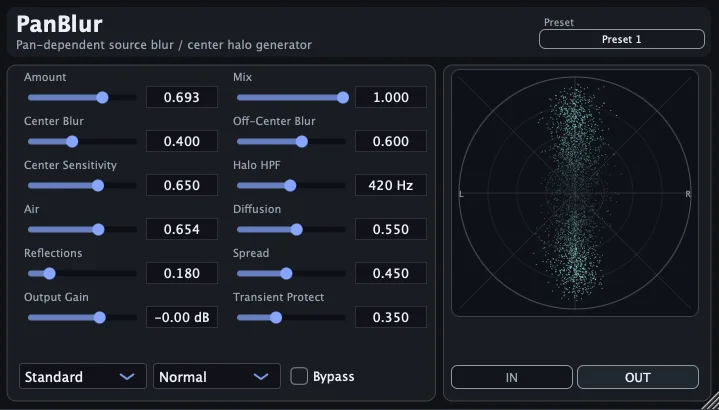
PanBlur
Key Features
- Turns dry mono sources into a softer stereo image while preserving the apparent pan location
- Blur and diffusion controls shape the halo around the source instead of relying on obvious reverb or chorus movement
- Air control adds subtle motion to the generated halo layer without moving the dry signal itself
- Transient Protect helps keep attacks from smearing when the stereo blur is pushed harder
- Master-insert concept can soften several panned tracks together from one instance
- Simple VST3 support for Windows plus AAX, AU, and VST3 support on macOS 11 or later
Description
PanBlur is a mono-to-stereo spatial enhancer from Kojima Audio for turning dry mono sources into a softer, more intimate stereo image. Instead of pushing the source wide or washing it in reverb, it keeps the core pan position stable and builds a blurred halo around it.
The plugin is aimed at cases where ordinary panning feels too narrow or artificial, but a conventional widener would make the source feel detached from its place in the mix. Its main controls shape the amount of processing, center and off-center blur, diffusion, spread, reflections, output gain, and transient protection, so the effect can stay subtle on close-miked material.
Version 1.1.0 adds Air, a gentle motion control that animates only the surrounding halo texture while leaving the dry image fixed. That makes PanBlur useful on sources such as classical guitar, vocals, percussion, or mono synth parts when you want movement around the sound rather than chorus-style modulation.
Kojima also frames PanBlur as a possible master-insert tool for softening multiple panned tracks together. That workflow is worth checking carefully in mono, but it gives the plugin a distinct role beyond simple track-by-track stereo widening.
Frequently Asked Questions
How is PanBlur different from a normal stereo widener?
PanBlur is designed to keep the source anchored near its pan position while creating a softer halo around it. A typical widener often stretches the whole signal outward, which can make mono sources feel less focused.
What does the Air control do?
Air adds gentle movement to the generated halo texture introduced in version 1.1.0. The dry source stays fixed, so the motion is meant to feel like life around the sound rather than chorus modulation on the source itself.
Can PanBlur be used on a master bus?
Kojima Audio presents a master-insert workflow as one possible use, especially for softening several panned tracks together. Because spatial processing can affect mono compatibility, check the result in mono before committing that approach.
Which plugin formats are included?
The official page lists AAX, AU, and VST3 for macOS 11 or later, and VST3 for Windows. The downloads are a macOS PKG installer and a Windows VST3 ZIP package.