
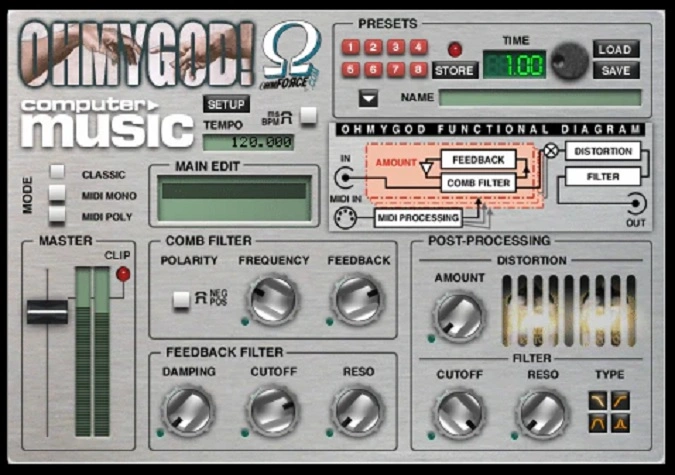
Legacy Ohmygod
Key Features
- MIDI-playable comb filter that turns any audio signal into a pitched, resonant instrument
- Legato and polyphonic modes for melodic lines, stacked chords, and harmonic layering through the filter
- Per-parameter LFOs on every control for complex evolving textures and tempo-synced gated patterns
- Preset Morphing for smooth real-time blending between saved parameter states
- Dual-purpose design that functions as both a standard insert effect and a playable MIDI instrument
- Constructive and destructive interference engine that produces everything from subtle shimmer to aggressive metallic resonances
- Wide creative range on vocals, drums, synths, and full mixes for both corrective and experimental sound design
Description
Ohmygod by Ohm Force is a playable comb filter plugin that blurs the line between effect and instrument. Originally a premium product from one of the most inventive plugin developers of the early 2000s, it became free when Ohm Force discontinued their legacy plugin line in 2023.
The plugin works by adding a delayed copy of the incoming signal back onto itself, creating the constructive and destructive interference patterns that define comb filtering. What sets Ohmygod apart is that you can play those comb filter frequencies from a MIDI keyboard, turning any audio source into a pitched, resonant instrument.
Legato and polyphonic modes let you perform melodic lines or stacked chords through the filter, opening up sound design possibilities that go well beyond typical filter sweeps. Every parameter has its own dedicated LFO, which makes it easy to build complex evolving textures and rhythmically gated patterns synced to your session tempo.
Preset Morphing lets you blend smoothly between saved states for gradual timbral shifts during a performance or arrangement. The results range from subtle metallic shimmer on vocals and drums to aggressive, alien-sounding resonances that work well in electronic and experimental genres.
Ohmygod runs on Windows 7 or later and macOS (Intel only, not compatible with Apple Silicon). It supports VST, AU, and AAX formats across all major DAWs.
Video Preview

Tips
- Use the comb filter on vocals to add a unique texture and depth.
- Experiment with the Preset Morphing feature to create evolving soundscapes.
- Apply the plugin to drum tracks to introduce rhythmic variations and complexity.
- Utilize the per-parameter LFOs to add dynamic movement to your sounds.
- Try using the plugin in both legato and polyphonic modes to explore different musical possibilities.
- Combine Ohmygod with other effects to create complex, layered sounds.
- Use MIDI automation to control the comb filter in real-time for live performances.
Frequently Asked Questions
Does Ohmygod work on Apple Silicon Macs?
No. Ohmygod is an Intel-only legacy plugin and does not run natively on Apple Silicon. You may be able to run it under Rosetta 2 translation in some DAWs, but Ohm Force does not officially support this and no longer provides updates or technical support for legacy products.
Can Ohmygod be used as a synthesizer on its own?
Ohmygod needs an incoming audio signal to process, so it is not a standalone synthesizer. However, you can feed it any audio source (even noise or a simple tone) and play the comb filter from a MIDI keyboard to produce pitched, melodic results that sound instrument-like.
What is the difference between legato and polyphonic modes?
Legato mode plays one comb filter voice at a time with smooth pitch transitions between notes, ideal for melodic lead lines. Polyphonic mode lets you trigger multiple comb filter voices simultaneously, which is useful for building chords and harmonic textures through the filter.
How do I get Ohmygod for free?
Visit the Ohm Force website at ohmforce.com and register with your name and email address. After registration, you can download Ohmygod and all other legacy Ohm Force plugins at no cost. The plugin was made free in August 2023 when Ohm Force discontinued its legacy product line.


