
Limited-Z
Key Features
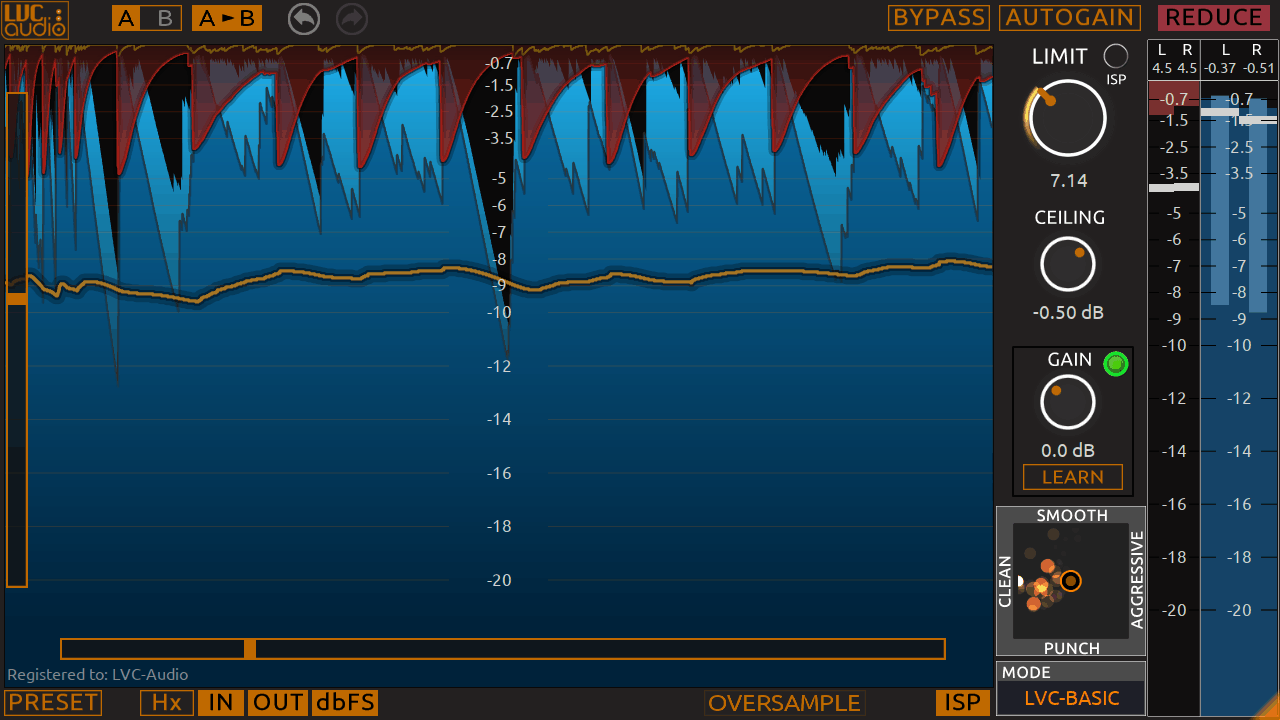
- Six dynamic limiting modes plus a variable clipping algorithm derived from ClipShifter
- Look-ahead brickwall limiting with transparent loudness at high gain-reduction levels
- Resizable GUI with real-time spectrum analyzer and waveform history (up to 2 minutes)
- ISP filtering and true peak output monitoring for broadcast-safe delivery
- User-customizable colors for waveform and spectrum displays with saveable defaults
- Program-dependent release timing and internal dynamic EQ for adaptive processing
- Based on the same core engine as the premium Limited-MAX mastering limiter
Description
Limited-Z by LVC-Audio is a look-ahead brickwall limiter built for mixing and mastering. It dynamically combines several unique limiting algorithms — including a variable clipping mode inherited from LVC-Audio's ClipShifter — to achieve transparent loudness without excessive distortion.
The plugin offers six reduction modes (LVC-Basic, Traditional, Deep, Aggressive, Smooth/Clean, and Loud/Punchy), plus a dedicated clipping algorithm. Internally it handles attack, release, knee, look-ahead, stereo linking, program-dependent release timing, dynamic EQ, and DC filtering, but these controls are packaged into simple mode selections so the interface stays clean.
Version 2 introduced a resizable GUI with a spectrum analyzer, a waveform history view extending up to two minutes of audio, customizable colors, ISP filtering, and true peak output monitoring. It is based on the same engine as LVC-Audio's premium Limited-MAX mastering limiter, delivering professional-grade processing in a simplified wrapper.
Users consistently rank it among the best limiter plugins in its class. Production Expert featured it as a Friday Free Plug-in pick, and BPB listed it as one of the top freeware limiters available for Windows and macOS.
Limited-Z supports VST, VST3, AU, and AAX formats on Windows (Vista and newer) and macOS (10.8 and later). An iLok device is required only for the AAX format.
Video Preview


Frequently Asked Questions
What is the difference between Limited-Z and Limited-MAX?
Limited-Z shares the same core limiting engine as Limited-MAX but with a simplified interface. The paid version of Limited-Z adds oversampling (up to 16x), continuous ceiling control, K-metering and EBU loudness modes, and adjustable X/Y algorithm tuning. Limited-MAX adds even more advanced metering and processing options beyond that.
Does a limiter reduce sound quality?
A well-configured limiter should not noticeably degrade sound quality at moderate gain-reduction settings. Limited-Z uses multiple look-ahead algorithms that minimize distortion artifacts. Pushing any limiter too hard will introduce audible pumping or clipping, but Limited-Z's six modes let you choose between transparency and aggression depending on the source material.
What limiter modes does Limited-Z offer and when should I use each?
Limited-Z includes LVC-Basic (general purpose), Traditional (classic limiting behavior), Deep (heavier compression), Aggressive (maximum loudness), Smooth/Clean (transparent mastering), and Loud/Punchy (energetic program material). Start with LVC-Basic or Smooth/Clean for mastering, and try Aggressive or Loud/Punchy for individual mix channels where you want more energy.
Does Limited-Z require an iLok?
Only for the AAX plugin format. The VST, VST3, and AU versions use a simple key-file copy protection and do not require any iLok hardware or software.


