
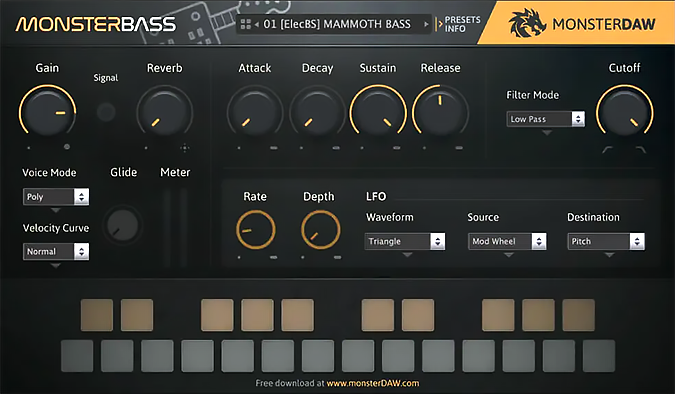
Monster Bass
Key Features
- 42 presets spanning synth bass, electric bass, and acoustic bass categories, each sampled and programmed from scratch
- Built-in saturation (Gain), reverb, filter section, ADSR envelope, glide knob, and LFO for shaping tones without external plugins
- Three voice modes — polyphonic, monophonic, and legato — for different playing styles and articulations
- Flexible sound library storage that can live on any drive, not just the system startup disk
- Full DAW parameter automation support for dynamic, evolving basslines in your arrangements
- Lightweight on CPU and RAM, keeping sessions responsive even on modest hardware
- Regular expansion sound updates from the developer, growing the preset library over time
Description
Monster Bass is a ROMpler bass instrument by Agus Hardiman (MonsterDAW) that covers synth, electric, and acoustic bass sounds in a single lightweight plugin. Version 2 ships with 42 presets across three categories: 14 electric bass, 23 synth bass, and 5 acoustic bass.
The interface keeps things streamlined with a filter section, ADSR envelope, glide control, LFO, and selectable voice modes including polyphonic, monophonic, and legato. A built-in gain stage adds saturation for extra warmth, while the master reverb lets you dial in ambience without reaching for external effects.
Each preset was programmed and sampled from scratch, delivering sounds that span genres from hip-hop and EDM to cinematic scoring and pop. The plugin supports full DAW parameter automation and lets you store the soundbank on any drive, keeping your system drive lean.
The playable range is intentionally limited to B0 through E3, keeping Monster Bass focused squarely on low-end duties rather than doubling as a melodic instrument. Reviewers have praised its preset quality as competitive with paid bass libraries, noting the straightforward workflow as a standout strength.
Monster Bass runs on Windows (64-bit VST2 and VST3) and macOS (VST and AU). Unsigned on Mac, so users will need to de-quarantine the plugin after installation.
Video Preview


Frequently Asked Questions
How do I install Monster Bass on macOS?
Download the macOS installer, unzip it, and place the plugin files in your AU or VST folder. Since Monster Bass is unsigned, macOS will quarantine it. You will need to de-quarantine the plugin using a terminal command or a tool like PlugDeQuar before your DAW can load it.
Where should I put the Monster Bass sound library?
The sound library can be stored on any drive, including external drives. When you first open Monster Bass in your DAW, it will prompt you to point to the folder where you unzipped the library files. This keeps your system drive free of large sample data.
Can I use Monster Bass for melodic parts above the bass register?
No. Monster Bass has a deliberately restricted range from MIDI note B0 to E3, covering roughly two octaves in the bass register. It is designed exclusively for basslines and low-end parts, not for leads or melodic lines.
Does Monster Bass work in Pro Tools?
Not natively. Monster Bass does not include an AAX format plugin. However, the developer recommends using a VST-to-AAX wrapper like Blue Cat's PatchWork to load it inside Pro Tools sessions.


