
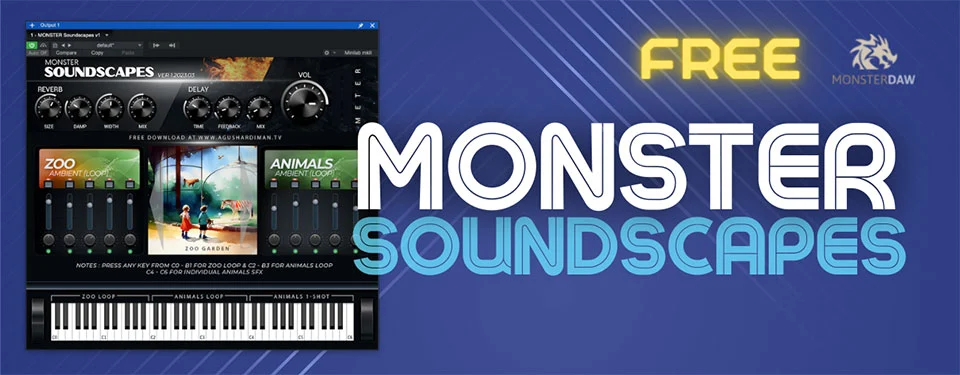
MONSTER Soundscapes
Key Features
- User-Friendly Interface: MONSTER Soundscapes boasts an intuitive, feature-packed interface that simplifies sound manipulation.
- Reverb and Delay Controls: Easily adjust reverb and delay effects with precision using dedicated controls.
- Rich Sound Sources: Access a wide range of sound sources, including hand-recorded samples and modified free materials.
- Ambient and SFX Categories: Choose from two distinct sound source categories, allowing for endless looping and creative triggering.
- Versatile Loops: Enjoy five randomly generated loops per sound source, as well as 25 standalone one-shot SFX.
- Presets: Explore eight carefully crafted presets with more to come, effortlessly enhancing your tracks with atmospheric depth.
- Lightweight: MONSTER Soundscapes is designed to be CPU-friendly, ensuring a seamless production experience.
- Multiple Key Zones: The plugin supports three key zones, with two for loops and one for one-shot samples.
- Formats: Available in VST, VST3, and AU plugin formats for Windows and Mac.
- Compatibility: While not officially Apple Silicon compatible, it can run smoothly via Rosetta on newer Mac devices.
Description
MONSTER Soundscapes is a multi-voice ambient and sound-effects instrument built around eight presets, looping atmospheres, and one-shot effects. The listed scenes include beach, jungle, rain, campfire, city, restaurant, zoo, and a sci-fi Starbase setting.
Each voice has volume, pan, and on/off controls, with master reverb, delay, and volume shaping the combined sound. The developer lists VST2/VST3 for Windows 64-bit and VST2/VST3/AU for Mac 64-bit, with a separate sound library folder selected when the plugin first loads.
Frequently Asked Questions
What kinds of scenes are included?
The eight listed presets cover beach and jungle birds, rain with thunder, a forest campfire, city and restaurant ambience, a zoo garden, and the Starbase Earth 2096 sci-fi scene.
Can individual sounds be mixed?
Yes. Each voice has its own volume, pan, and on/off controls, and the instrument provides master reverb, delay, and volume controls.
How does the sound library load?
Download and unzip the separate library, then point the plugin to that folder when it asks for the library location.
Which plugin formats are listed?
The developer lists VST2 and VST3 for Windows 64-bit, and VST2, VST3, and Audio Unit for Mac 64-bit.


