
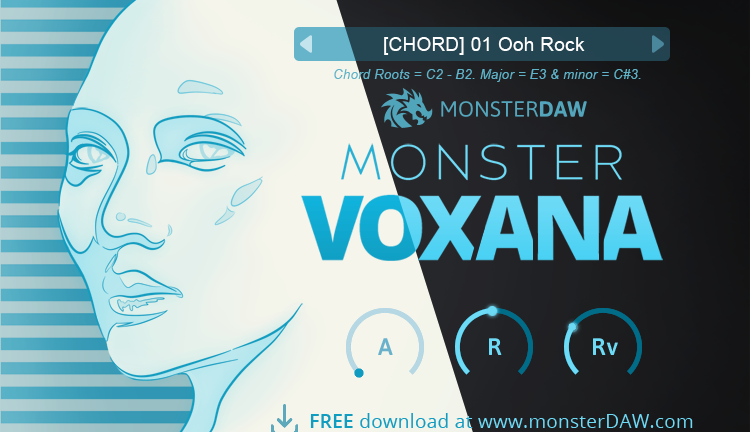
MONSTER Voxana
Key Features
- 31 vocal presets across five modes: Beatbox, Chops, Chord, Notes, and Shout for versatile vocal textures
- Chromatic Chops mode that maps vocal samples across the keyboard for melodic vocal chop creation
- Streamlined three-knob interface with attack, release, and reverb controls for quick sound shaping
- Full DAW parameter automation support for dynamic, evolving vocal parts in your mix
- 334 MB sound library with external storage option to keep your system drive uncluttered
- Regular expansion preset releases from MonsterDAW that continuously expand the sound palette
- Lightweight on CPU and RAM with selectable dark and bright GUI skins
Description
MONSTER Voxana is a vocal sampler instrument from MonsterDAW (Agus Hardiman) that delivers 31 playable presets spanning beatbox patterns, choirs, vocal chops, sustained notes, and shout effects. The plugin covers a wide stylistic range, making it useful across genres from EDM and hip-hop to pop, R&B, jazz, and even classical arrangements.
Five distinct preset modes organize the sound library: Beatbox, Chops, Chord, Notes, and Shout. The standout Chops mode lets you trigger and pitch vocal samples chromatically across the keyboard, a feature rarely found in instruments at any price point.
The interface keeps things deliberately minimal with just three knobs controlling attack, release, and reverb amount. Parameter automation is fully supported, so you can record dynamic changes directly in your DAW session.
The 334 MB sound library can be stored on an external drive rather than your system disk, keeping your main installation lightweight. MonsterDAW also releases expansion presets on a regular basis, steadily growing the instrument's sound palette over time.
Voxana runs as a 64-bit plugin on Windows (VST2/VST3) and macOS (VST2/VST3/AU), with double-click knob reset and selectable dark or bright GUI skins included.
Video Preview


Frequently Asked Questions
Does MONSTER Voxana work in Pro Tools?
MONSTER Voxana does not natively support AAX format, so it cannot load directly in Pro Tools. You can use a plugin wrapper like BlueCat Patchwork to run it inside Pro Tools as a VST or AU plugin.
How do I install MONSTER Voxana on macOS?
Since the plugin is unsigned by Apple, macOS may block it by default. You need to allow it through your system's Security & Privacy settings after the initial install attempt. The sound library is downloaded separately and linked on first launch.
Can I play vocal chops in different keys with Voxana?
Yes, the dedicated Chops mode maps vocal samples chromatically across the keyboard. This lets you create pitched vocal melodies and chop patterns by playing different notes, similar to how you would use a sampler instrument.
Does the sound library have to be on my main hard drive?
No, the 334 MB sound library can be stored on any drive, including external drives. During first launch, the plugin prompts you to choose the library folder location, so you can keep it off your system disk.


