
Noisebud Filter
Key Features
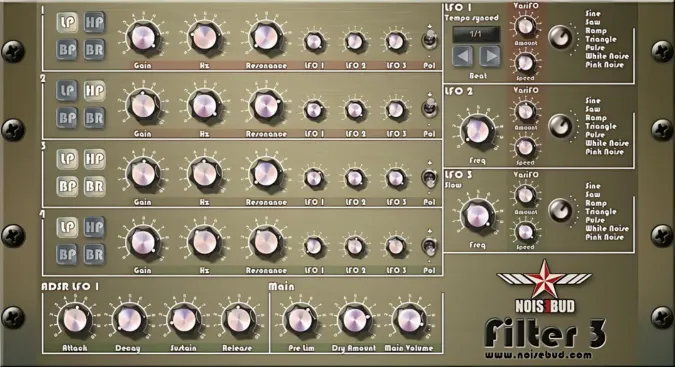
- Four parallel filters switchable between low-pass, high-pass, band-pass, and band-reject modes for layered frequency shaping
- Three LFO sources per filter including tempo-synced, standard-rate, and ultra-slow sLoFO for gradual tonal movement
- VariFO modulation adds organic unpredictability to each LFO, preventing repetitive mechanical cycling
- Phase invert button on every filter enables frequency cancellation during overlapping sweeps for vocal-like resonances
- Freely mixable filter types per slot — run four low-pass filters or combine different modes on a single unit
- Parallel signal chain processes all four filters simultaneously for additive, layered filtering effects
- Tempo-synced LFO locks filter sweeps to your DAW's BPM grid for rhythmically tight modulation
Description
Noisebud Filter is a creative multi-filter effect plugin that chains four independent filters in parallel, each switchable between low-pass, high-pass, band-pass, and band-reject modes. With version 3.11, you can mix filter types freely across all four slots, running four low-pass filters simultaneously or combining a low-pass and band-pass on a single unit.
Every filter has its own trio of LFO sources: a tempo-synced LFO that locks to your DAW's BPM grid, a standard-rate LFO for classic sweeps, and an extremely slow sLoFO designed for gradual tonal drifts over long passages. The VariFO feature adds a secondary modulation layer on top of each LFO, introducing organic unpredictability that prevents the cycling from sounding mechanical.
Each filter includes an invert button that flips the phase of its output, letting you cancel out frequencies where two filter sweeps overlap. This phase-cancellation technique is particularly effective during heavy modulation, creating hollow, vocal-like resonances and unusual spectral notches that would be difficult to achieve with a single filter.
The parallel signal chain means all four filters process the input at the same time rather than feeding into each other in series. This architecture produces a layered, additive filtering effect where each band carves its own frequency window independently.
Noisebud Filter is a 32-bit VST plugin for Windows, with experimental macOS builds available for Catalina and newer. The Microsoft Visual C++ 2015 Redistributable is required on Windows.
Video Preview

Frequently Asked Questions
What is VariFO and how does it differ from a standard LFO?
VariFO is a secondary modulation layer that sits on top of each LFO in Noisebud Filter. It adds another movement pattern to the existing LFO shape, making the filter sweep less predictable and more organic. Think of it as an LFO modulating another LFO, which prevents the cycling from sounding repetitive over time.
Can Noisebud Filter run in 64-bit DAWs?
Noisebud Filter is a 32-bit VST plugin, so it requires a bridge application like jBridge or a DAW with built-in 32-bit bridging to run inside a 64-bit host. Some modern DAWs have dropped 32-bit support entirely, so check your host's compatibility before installing.
What does the phase invert button actually do?
The invert button on each filter flips the phase of that filter's output signal. When two filters sweep across overlapping frequencies, the inverted phase causes those shared frequencies to cancel out rather than reinforce. This creates hollowed-out, notch-like effects and unusual spectral textures during heavy modulation.
Is there a macOS version of Noisebud Filter?
There are experimental macOS builds available for Catalina and newer, but Noisebud considers these test versions. Mac users may need to bypass Apple's Gatekeeper security via System Preferences or Terminal commands to install the plugin.


