Orbit
Key Features
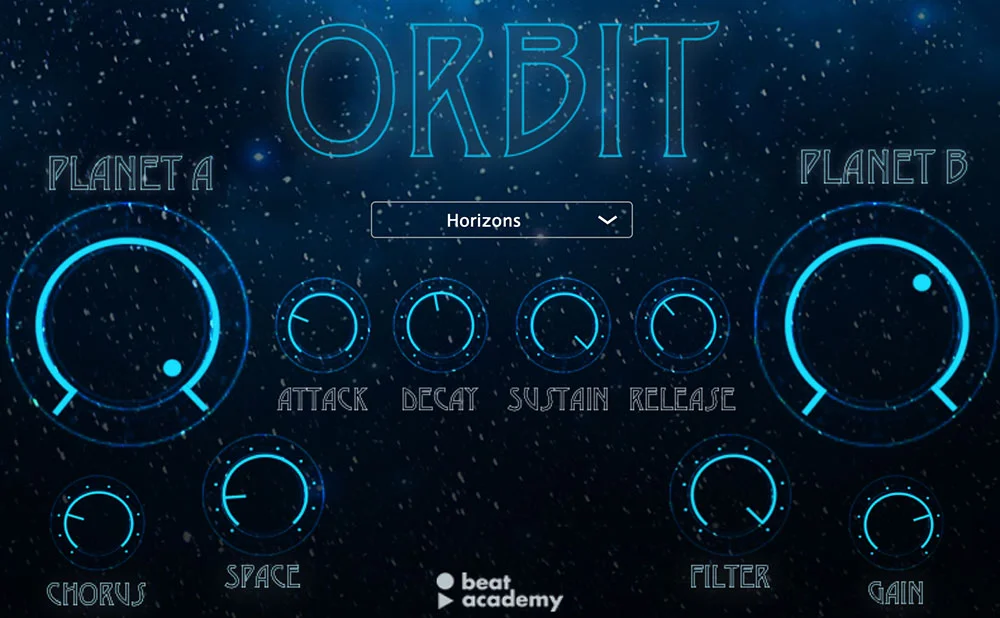
- Dual sound modules (Planet A and Planet B) for layering two sample sources per preset
- Built-in chorus and space (reverb) effects for instant width and depth
- Full ADSR envelope control for shaping amplitude on each sound source
- Adjustable filter and gain controls for tonal sculpting per layer
- Cinematic preset library spanning atmospheric pads, evolving textures, drones, and ethereal keys
- Lightweight and CPU-friendly thanks to the Maize Sampler engine
- Available as both VST3 and AU plugin formats for cross-DAW compatibility
Description
Orbit is a sample-based virtual instrument from Beat Academy, designed by Grammy-nominated producer Ill Factor. Built with the Maize Sampler engine, it delivers polished, cinematic pad and key sounds through two layerable sound modules called Planet A and Planet B.
Each preset combines two sound sources that can be blended and shaped using dedicated ADSR envelopes, filters, and gain controls. Built-in chorus and reverb effects (labeled "Chorus" and "Space") add width and depth without needing external processing.
The preset library covers expansive territory, from glassy evolving textures like Angelic Glass and Blue Stars to weightier drones like Nebulas and Galactic. The sounds lean heavily toward atmospheric and ethereal rather than aggressive or percussive, making Orbit particularly well-suited to cinematic scoring and ambient electronic production.
While the Maize Sampler foundation means Orbit lacks deep synthesis features like oscillator morphing or modulation matrices, the included samples are exceptionally well-recorded and processed. The simplified control set keeps the workflow fast, letting producers focus on composition rather than sound design.
Orbit requires a valid email address to download from the Beat Academy website. Installation is manual: you drag the VST3 or AU component file to the appropriate plugin folder on your system.
Video Preview


Frequently Asked Questions
What DAWs does Orbit work with?
Orbit supports VST3 and AU plugin formats, making it compatible with most modern DAWs on Windows and macOS including Ableton Live, FL Studio, Logic Pro, Cubase, Studio One, and Cakewalk. It does not support the older VST2 format or AAX for Pro Tools.
How do you install Orbit?
Orbit uses manual installation rather than an installer. After downloading and extracting the files, you drag the .vst3 file to your VST3 plugin folder (or the .component file to your AU folder on macOS). Most DAWs will detect it on the next rescan.
Can you edit or create new sounds in Orbit, or is it presets only?
Orbit is a rompler, meaning it plays back pre-recorded samples rather than generating sound from scratch. You can shape each preset using the ADSR envelope, filter, gain, chorus, and space controls, but you cannot import your own samples or create entirely new patches from oscillators.
What is the difference between Planet A and Planet B in Orbit?
Planet A and Planet B are Orbit's two independent sound layers. Each layer loads a different sample source, and both play simultaneously within a preset. You can adjust the volume, envelope, and filter of each layer separately to create blended textures.