OrilRiver
Key Features
- 12 early reflection variations and 5 reverb tail types for detailed spatial modeling from small rooms to large concert halls
- 64-bit internal floating point processing with sample rates from 44.1 kHz to 192 kHz for artifact-free reverb tails
- 3-band equalizer on the wet signal for shaping the tonal character of the reverb space
- Damping intensity control with adjustable high-cut frequency for natural high-frequency decay behavior
- Low CPU footprint of approximately 4-5% per instance, allowing multiple reverb sends in a single session
- Stereo width control and pre-delay adjustment for precise placement of instruments within the stereo field
- Two selectable graphical interface skins with factory presets covering rooms, halls, plates, and ambient spaces
Description
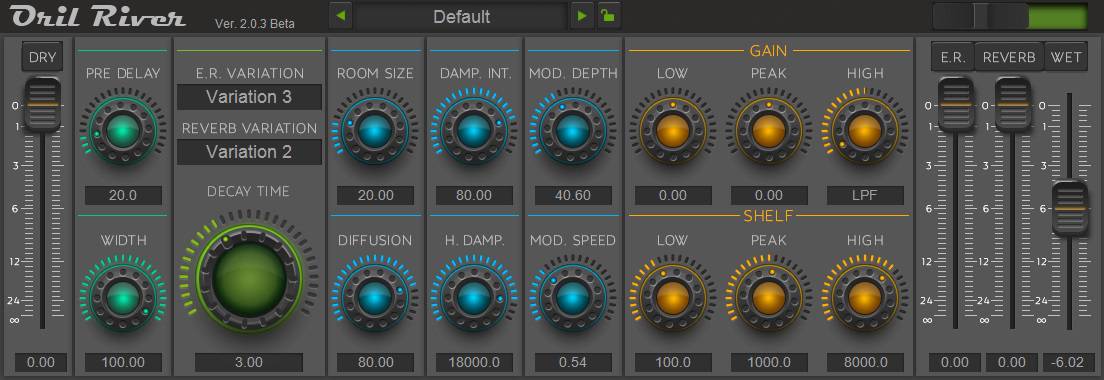
OrilRiver is an algorithmic stereo reverb plugin developed by Denis Tihanov that generates realistic room and hall reverberation through mathematical algorithms rather than convolution impulse responses. It offers 12 variations of early reflections and 5 reverb tail types, giving you precise control over spatial characteristics from tight ambiences to expansive halls.
The plugin provides a comprehensive set of controls including pre-delay, room size, diffusion, stereo width, and damping intensity with a separate high-cut frequency parameter. A built-in 3-band equalizer shapes the wet signal, letting you sculpt everything from bright plate-style reflections to dark, warm spaces.
Internal signal processing runs at 64-bit floating point with sample rate support from 44.1 kHz up to 192 kHz, ensuring clean tails even at long decay times. CPU usage sits around 4-5% per instance, making it practical to run multiple instances with different settings across a mix.
Users consistently rank OrilRiver among the strongest algorithmic reverbs available, praising its natural-sounding decay and smooth high-frequency rolloff. The interface includes two selectable GUI skins and factory presets that cover common mixing scenarios out of the box.
Development reached version 2.0.3 beta before being suspended, though the plugin remains fully functional and compatible with modern DAWs on both Windows and macOS.
Video Preview


Frequently Asked Questions
Is OrilRiver still compatible with modern DAWs?
Yes. Despite development being suspended at version 2.0.3 beta, OrilRiver continues to work in current versions of popular DAWs including Ableton Live, FL Studio, Cubase, Logic Pro, and REAPER. It supports VST, VST3, and AU plugin formats.
How does OrilRiver compare to convolution reverbs?
OrilRiver uses algorithmic processing rather than impulse response files, which means it generates reverb mathematically in real time. This gives it more flexibility in shaping decay characteristics and uses less CPU than most convolution reverbs, though it does not replicate specific real-world spaces the way a convolution reverb can.
Can OrilRiver handle long ambient reverb tails without artifacts?
Yes. The 64-bit floating point internal processing and support for sample rates up to 192 kHz ensure clean, artifact-free reverb tails even at extended decay times. The diffusion and damping controls help maintain smooth tails without metallic ringing.
Does OrilRiver support preset saving and recall?
OrilRiver includes factory presets and supports saving custom presets through the plugin interface. Some users have reported occasional issues with preset recall in certain DAW configurations, so saving project files rather than relying solely on the plugin's preset system is recommended as a safeguard.