
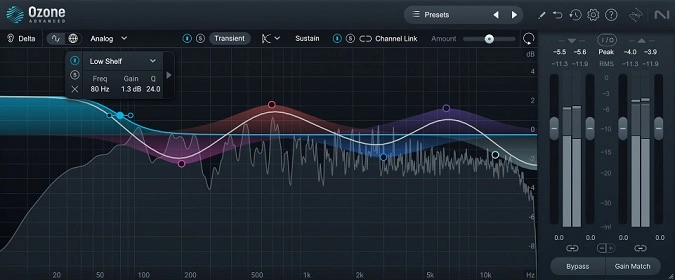
Ozone 11 EQ
Key Features
- Transient/Sustain processing mode that applies independent EQ curves to the attack and body of audio signals
- Mid/Side and Left/Right stereo channel modes for targeted stereo-field shaping during mixing or mastering
- Gain Match automatically levels output volume so EQ decisions are based on tonal change, not perceived loudness
- Delta monitoring solos only the affected frequencies, revealing exactly what your EQ adjustments add or remove
- Amount slider scales your entire EQ curve proportionally with one control for quick fine-tuning
- Analog and digital EQ modes offering a choice between smooth analog-modeled roll-off and precise digital filtering
- Clean high-frequency response without Nyquist cramping, derived from the full Ozone mastering suite engine
Description
Ozone 11 EQ is the standalone equalizer module extracted from iZotope's acclaimed Ozone mastering suite, available at no cost through Native Instruments. It delivers the same parametric EQ engine found in the full Ozone package, giving you mastering-grade frequency shaping inside any mix session.
The plugin's Transient/Sustain channel mode sets it apart from typical equalizers. Splitting incoming audio into attack and body components lets you apply different EQ curves to each, so you can tame harsh transients without dulling the sustained tone of an instrument.
Mid/Side and Left/Right processing modes open up precise stereo-field sculpting. Boosting high frequencies in the side channel, for example, adds width and air to a master without cluttering the center image.
Gain Match keeps perceived loudness consistent while you work, removing the bias toward louder-sounding settings. The Delta button solos only the frequencies being affected by your EQ moves, making it easy to hear exactly what you are adding or removing.
An Amount slider scales your entire EQ curve up or down with a single control, which is useful for dialing back aggressive moves in one gesture. Both analog and digital EQ modes are included, letting you choose between the smooth roll-off of analog-modeled filters and the precision of digital minimum-phase curves.
Engineers on forums praise its clean high-frequency response, noting it does not exhibit cramping near the Nyquist frequency. CPU usage is higher than a stock DAW EQ, which is expected given its mastering-focused algorithm, but it remains manageable on modern systems.
Video Preview


Tips
- Use the Transient/Sustain mode to separately enhance the attack and body of your sounds.
- Apply Mid/Side processing to widen the stereo image or correct imbalances.
- Utilize the Gain Match feature to avoid the "louder-is-better" trap and make more accurate EQ decisions.
- Experiment with both analog and digital modes to find the best sound for your track.
- Use high-pass and low-pass filters to clean up unwanted frequencies and focus on the essential parts of your mix.
- Take advantage of the Delta feature to fine-tune your EQ adjustments by hearing only the changes made.
- Integrate Ozone 11 EQ into your mastering chain for a polished, professional sound.
- Regularly check the phase response and phase delay to ensure your EQ adjustments are not causing phase issues.
Frequently Asked Questions
What is the difference between the Transient/Sustain and Mid/Side modes?
Transient/Sustain splits the audio into attack and body components so you can EQ each separately, such as softening harsh pick attacks on a guitar without losing sustain warmth. Mid/Side splits the signal into center and stereo information, letting you boost width in the sides or tighten the low end in the center channel.
Does Ozone 11 EQ add noticeable latency to a project?
It introduces more latency than a basic stock DAW equalizer because its algorithm is optimized for mastering-grade precision. Most users place it on mix buses or the master chain where a few milliseconds of latency is not an issue, but it can be used on individual tracks if your system handles the added processing.
How does Gain Match work and why should I use it?
Gain Match automatically adjusts the output level to compensate for any volume change caused by your EQ moves. This prevents the common bias where louder-sounding settings seem better, helping you make objective tonal decisions based on actual frequency balance rather than perceived loudness.
Can Ozone 11 EQ be used for mixing individual tracks or is it only for mastering?
It works well on individual tracks, buses, and the master channel. The Mid/Side and Transient/Sustain modes are particularly useful on vocals, drums, and guitars during mixing. While it was designed as part of a mastering suite, its feature set is versatile enough for any mixing task.


