Phasereplicant
Key Features
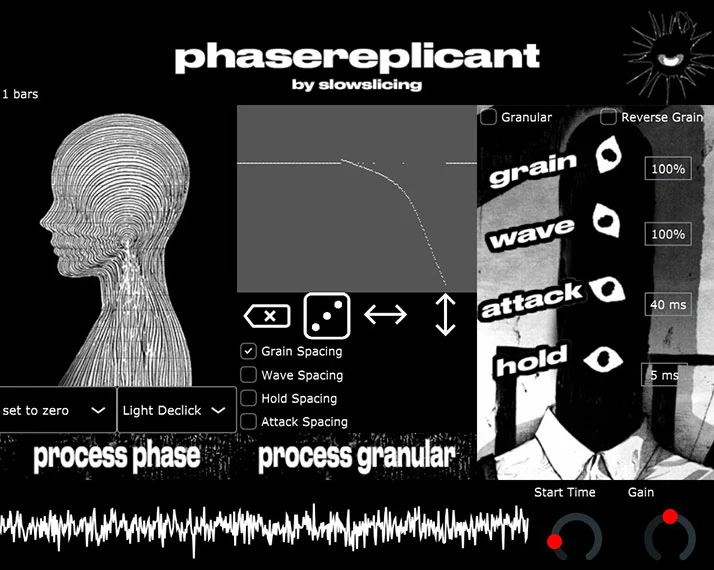
- Splits audio into 256 frequency bands with independent granular synthesis on each band for deep spectral manipulation
- Drawable per-band granular graph for precise control over Grain Spacing, Wave Spacing, Hold Spacing, and Attack Spacing
- Phase processing modes including zero phase and full randomization that preserve harmonic content while transforming timbre
- Live granular section with real-time Grain, Wave, Attack, and Hold controls plus reverse grain playback
- Drag-and-drop waveform export directly from the plugin interface into your DAW timeline
- Visual waveform display with gain and start time controls for monitoring and adjusting playback position
Description
Phasereplicant by Slowslicing is a spectral granular synthesizer that splits incoming audio into 256 individual frequency bands, then applies independent granular synthesis to each one. The result is smeared, blurred, and deconstructed textures that preserve the harmonic character of the original source material.
At the center of the interface sits a drawable, resizable graph for editing per-band granular parameters including Grain Spacing, Wave Spacing, Hold Spacing, and Attack Spacing. A dropdown menu lets you zero out or fully randomize the phase across all bands, producing everything from glassy spectral freezes to chaotic, evolving drones.
The live granular section provides real-time grain manipulation with dedicated Grain, Wave, Attack, and Hold controls, plus a reverse toggle for backwards grain playback. Users have praised the plugin for its unique sound-shaping capability, though the knobs are notably sensitive and require a careful touch.
A standout workflow feature is the built-in drag-and-drop export: you can drag the processed waveform directly from the plugin window into your DAW timeline, instantly bouncing your spectral granular experiments to audio. This makes Phasereplicant equally useful as a sound design sketchpad and a production tool.
Phasereplicant runs as a 64-bit VST3 plugin on Windows only and requires an OpenGL 2.1 compatible graphics card for its visual interface.
Video Preview

Frequently Asked Questions
What is spectral granular synthesis?
Spectral granular synthesis combines two sound design techniques: spectral processing (splitting audio into frequency bands using FFT analysis) and granular synthesis (chopping audio into tiny grains and reassembling them). Phasereplicant applies granular synthesis independently to each of its 256 frequency bands, allowing you to manipulate the texture and timing of individual spectral components while keeping the overall harmonic structure intact.
Can I export the processed audio from Phasereplicant?
Yes. Phasereplicant includes a built-in drag-and-drop export feature. After processing your audio through the spectral granular engine, you can drag the rendered waveform directly from the plugin's display into your DAW timeline. This bounces the result to an audio file without needing to record or freeze the track separately.
Does Phasereplicant work as a real-time effect or only offline?
Phasereplicant works in both modes. The live granular section processes audio in real time with dedicated controls for grain manipulation and a reverse toggle. The spectral phase processing section operates on loaded audio, which you can then export via drag-and-drop. Both approaches produce usable results within your DAW session.
Why do the knobs in Phasereplicant feel so sensitive?
Multiple users on KVR Audio have noted that Phasereplicant's knobs respond to very small mouse movements, which can make precise adjustments tricky at first. This is a known characteristic of the interface. Using your DAW's parameter fine-tuning shortcut (often Shift+drag or Ctrl+drag) can help make more precise adjustments.