
TapeEngine
Key Features
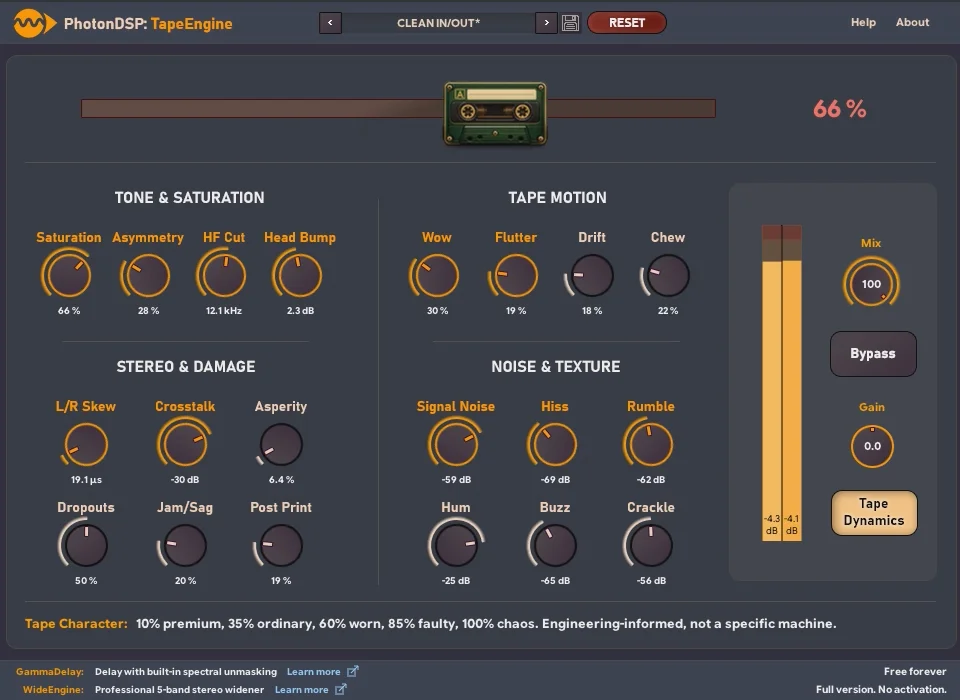
- More than twenty independently adjustable tape-processing modules go beyond a single saturation or wow-and-flutter control.
- Separate controls shape harmonic saturation, asymmetry, high-frequency softening, and low-frequency head-bump-style weight.
- Transport and stereo imperfections include speed variation, crosstalk, dropouts, and channel-focused character changes.
- Multiple noise sources let you introduce grain, hiss, mechanical rumble, hum, buzz, and crackle independently.
- Tape Dynamics adds soft-knee recording-style compression with dynamic high-frequency softening.
- The cassette-shaped Tape Character macro moves quickly from premium tape to broken-machine behaviour while preserving access to detailed controls.
- Factory presets and saveable custom presets support quick starting points and repeatable tape treatments.
Description
TapeEngine is a Windows VST3 tape-simulation effect by PhotonDSP for moving from polished analogue colour to conspicuously worn cassette behaviour. Its processing is split into more than twenty independently adjustable modules, so a mix can receive gentle saturation and head-bump weight or much stronger instability, noise, and damage without relying on one broad lo-fi control.
The individual controls cover harmonic saturation and asymmetry, high-frequency softening, low-frequency boost, speed variation, crosstalk, dropouts, and several kinds of noise. A separate Tape Dynamics section adds soft-knee recording-style compression and dynamic high-frequency softening, allowing the tonal and dynamic sides of the effect to be shaped together.
For quicker results, the cassette-shaped Tape Character control coordinates the processing from a clean, premium machine toward progressively ordinary, worn, and broken tape states. That macro does not lock the sound: every module remains available for manual adjustment, and factory presets provide starting points for tracks, buses, and sound-design experiments.
TapeEngine is deliberately a focused Windows-only effect rather than a cross-platform suite. The current 1.1 release requires a 64-bit VST3-compatible DAW, and its detailed control set makes it especially useful when a simple wow-and-flutter or saturation plug-in is not enough.
Frequently Asked Questions
What does TapeEngine model beyond ordinary tape saturation?
TapeEngine separates many aspects of tape behaviour into individual modules, including tonal coloration, transport movement, stereo imperfections, damage, dropouts, and noise. This makes it suitable for both restrained tape colour and deliberately degraded cassette-style processing.
What is the Tape Character control?
Tape Character is a cassette-shaped macro that coordinates all twenty processing modules through calibrated settings. It moves from a high-quality tape-machine character toward ordinary, worn, and broken states, while the underlying modules can still be adjusted manually.
What does the Tape Dynamics section add?
Tape Dynamics supplies soft-knee recording-style compression and dynamic high-frequency softening. It is separate from the other tape modules, so you can combine dynamic tape behaviour with the amount of coloration or mechanical wear you want.
Which systems and plug-in format does TapeEngine support?
TapeEngine is a 64-bit VST3 plug-in for Windows only. The developer lists Windows 10 or later, a VST3-compatible 64-bit DAW, 8 GB RAM, 25 MB free disk space, and a 1920 × 1080 or higher display among its minimum requirements.


