
Pyrite

Key Features
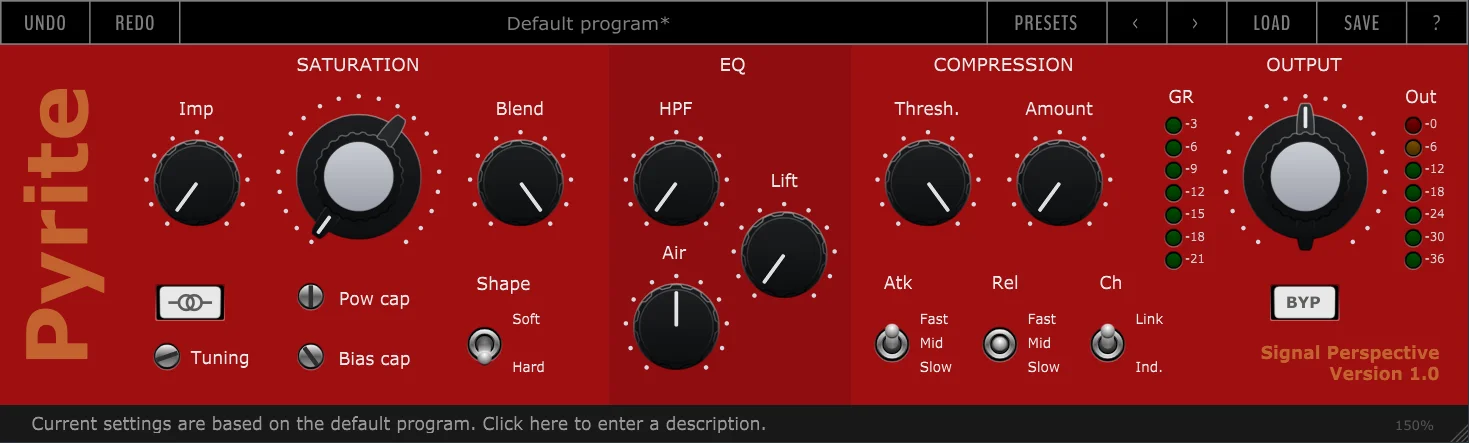
- Preamp-style processing chain with transformer coloration, saturation, compression, EQ, and output trim
- Tunable transformer stage that can add low-end weight while also acting as an input high-pass filter
- Soft and hard knee saturation modes with model-tuning controls and parallel Blend
- Unique compressor designed to lift quieter detail rather than simply clamp transients
- Musical high-pass, air shelf, and low-shelf EQ for fast broad-stroke tone shaping
- 192kHz / 64bit internal oversampling for cleaner high-frequency behavior
- Resizable interface with undo, redo, preset management, and tooltips
Description
Pyrite is a preamp-style saturation plugin that combines transformer color, drive, compression, simple EQ, and output trimming in one focused processor. Its signal path runs transformer into saturation, compression, EQ, and output trim, so it works more like a compact character channel than a single-purpose distortion effect.
The saturation stage is loosely inspired by testing a Golden Age Pre-73 DLX MkII, but Signal Perspective frames Pyrite as an expanded recreation rather than a strict hardware clone. You can tune the transformer behavior, switch between soft and hard knee saturation, and use Blend to keep the original signal underneath the added harmonics.
The compression section is intentionally unusual, emphasizing quieter detail more than peak control at moderate settings. Paired with the high-pass, air shelf, and low-shelf EQ, Pyrite is strongest for broad tone shaping on drums, vocals, bass, and buses where you want density, lift, and analog-style movement without building a full plugin chain.
Frequently Asked Questions
Is Pyrite a strict Golden Age Pre-73 emulation?
No. Signal Perspective says the original testing started from a Golden Age Pre-73 DLX MkII, but Pyrite became an expanded preamp-style processor with extra saturation, compression, and EQ controls rather than a direct clone.
What order does Pyrite process the signal in?
The developer documents the internal topology as Transformer, Saturation, Compression, EQing, then Output trimming. That order matters because the tone controls sit after the saturation and dynamics stages.
Why is the Windows manual install used here instead of the installer?
The developer warns that the Windows installer may be falsely flagged as a Trojan or virus on some systems. The manual install ZIP avoids that installer path and includes the VST3 file plus the Signal Perspective preset folder.
Does Pyrite include presets?
Yes. The download archives include preset folders for buses, tracks, and user presets, and the developer notes that the preset tree should be placed under the Signal Perspective product folder in the user's documents folder.


