
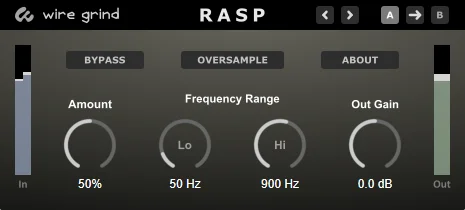
Rasp
Key Features
- Non-clipping distortion-like processing for rough, gritty, or noisy audio texture
- Amount control for moving from subtle hoarseness to extreme noisy fuzz
- Low and high frequency controls for focusing the range of the added noise
- Oversampling switch to help suppress aliasing during heavier settings
- Simple input/output metering, bypass, and output gain for fast level matching
- Undo/redo plus A/B parameter storage for comparing two settings while designing sounds
Description
Rasp by Wire Grind Audio is a Windows VST3 effect that makes incoming audio sound rough, noisy, and raspy without working like a conventional clipping distortion. Its core job is simple: add controlled non-harmonic grit that can move from subtle hoarseness to extreme noisy fuzz.
The plugin is especially useful when a clean source needs more spectral activity before filtering, automation, or transition effects. On vocals and drums it can add scratchy texture, while higher settings can push synths, instruments, or effects returns into more abrasive sound-design territory.
Rasp keeps the interface deliberately lean, with controls for amount, output gain, a low/high frequency range for the added noise, bypass, oversampling, and input/output monitoring. The A/B parameter save system and undo/redo buttons make it practical for quick sound exploration rather than deep menu work.
Use it when you want a roughening effect that sits between noise injection, fuzz, and distortion, especially for electronic builds, filtered transitions, gritty drums, and intentionally damaged vocal layers. The official page lists Rasp as version 1.1.1 and provides a one-click Windows installer.
Frequently Asked Questions
Is Rasp a normal clipping distortion plugin?
No. Wire Grind describes Rasp as a distortion-like effect that does not clip waveforms, so it is better understood as a roughening and noise-based texture tool. It can still produce fuzz-like results when pushed hard.
What kinds of sounds does Rasp work best on?
The official page points to vocals, drums, instrument tracks, pads, filtering effects, transitions, and over-the-top fuzz. It is most useful when a clean signal needs extra grit or noisy spectral content before further processing.
Why does Rasp include frequency range controls?
The low and high controls set the frequency range of the added noise. That makes it easier to add rasp in a focused part of the spectrum instead of roughening the entire signal equally.
Are there demos available?
The BPB release article noted that there did not appear to be official or user demos available at the time of publication. No reliable third-party demo was found.


