
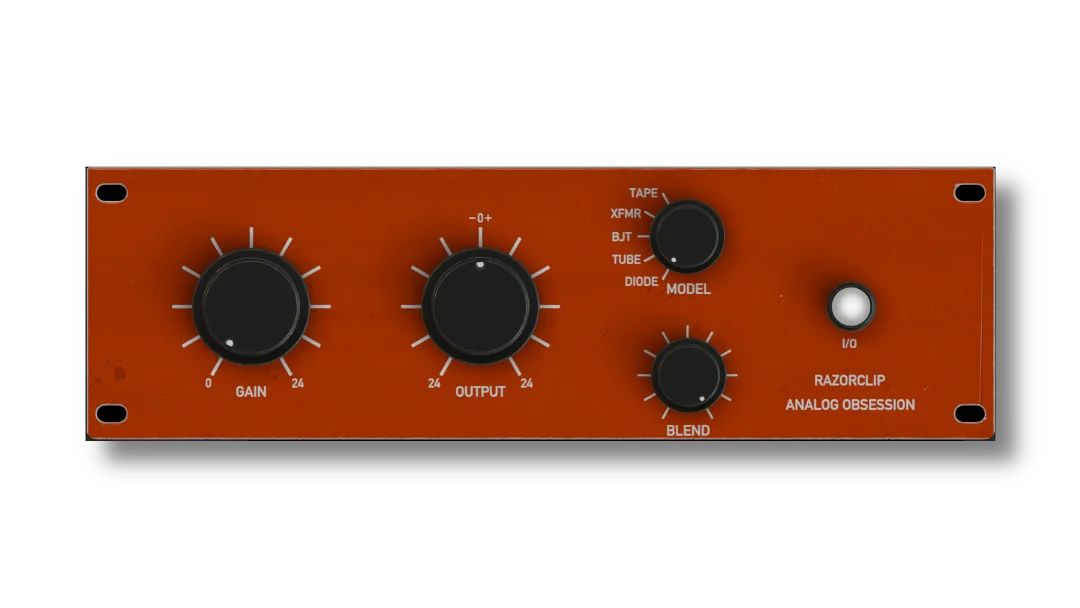
RazorClip
Key Features
- Five switchable clipping models let you move between tape-like smoothing, transformer weight, transistor bite, tube density, and diode-style edge without swapping plugins
- Gain-compensated input control makes it easier to push into clipping by ear instead of being fooled by raw level jumps
- Dedicated output trim lets you loudness-match after clipping, which is useful for honest before-and-after decisions on buses and full mixes
- Blend control handles parallel clipping inside the plugin, so you can keep more transient snap while still adding density and harmonic color
- Simple I/O bypass and a resizable 50% to 200% interface keep it fast to audition across different screens and DAW layouts
- Public macOS and Windows downloads are still live from the official release page, with no registration wall inserted into the current delivery flow
Description
RazorClip is an analog-based clipper from Analog Obsession built for louder drums, basses, and mix buses without locking you into one clipping flavor. Instead of treating clipping as a single blunt process, it gives you five modeled circuit characters so you can choose between tape-like rounding, transformer weight, transistor bite, tube density, or diode edge from the same compact interface.
That makes it more flexible than a utility peak shaver. Gain and output controls both cover 24 dB, the blend knob enables parallel clipping inside the plugin, and the separate character modes let you move from subtle transient smoothing to obvious harmonic color without rebuilding your chain.
In practice, RazorClip looks best suited to producers and mix engineers who want fast loudness shaping with some tone baked in. The resizable GUI, quick bypass comparison, and dry/wet-style blend make it easy to audition on drum buses, synth bass, vocals, or a master chain when you want extra density but still need control over how aggressive the clipping feels.
It also qualifies as a permanent freeware release rather than a short launch promo. Analog Obsession still keeps the public Patreon product page live with direct macOS and Windows downloads, and current third-party listings continue to categorize RazorClip as a free release instead of a temporary giveaway.
Video Preview
Frequently Asked Questions
Does RazorClip emulate one specific hardware clipper?
No. Analog Obsession describes the five modes as ideal analog models rather than recreations of one exact unit. The point is to give you different clipping behaviors and harmonic flavors without tying the plugin to a single hardware reference.
What changes when you switch between the five modes?
Each mode changes the clipping circuit character, so the same amount of drive can feel rounder, thicker, sharper, or more obviously colored depending on the selection. Tape, Tube, and Diode lean into familiar saturation flavors, while XFMR and BJT add their own transformer and transistor-style bite.
Is RazorClip only useful on the master bus?
No. It makes sense on masters, but the control set is just as practical on drum buses, basses, vocals, and individual synth channels where you want peak control plus some harmonic attitude. The character switch and blend control make it easy to dial in smaller amounts on sources that cannot take heavy clipping.
Can you keep transients while still pushing loudness?
Yes. The Blend control lets you mix clean signal back under the clipped signal, which is the easiest way to preserve more attack while still shaving peaks and adding density. That makes RazorClip useful for parallel-style clipping without needing extra routing in your DAW.


